
AI crawler checker tools are becoming increasingly useful for website owners who want to understand how AI systems can access their content. A website can load perfectly for human visitors and still have crawler rules that restrict particular AI bots.
Nizwas IT Solutions created a free AI Bot Crawler Checker to make this technical check easier. Instead of manually interpreting every User-agent, Allow, and Disallow rule in a robots.txt file, you can enter a website and review how supported AI and search crawlers are configured.
The important point is that crawler access is not the same thing as AI visibility.
Allowing an AI crawler does not guarantee that ChatGPT, Claude, Perplexity, Google or another AI system will mention your website. It simply helps answer a more basic technical question:
Can the crawler access the website according to the site’s robots.txt configuration?
That distinction matters when troubleshooting AI search visibility.
What Is an AI Crawler Checker?
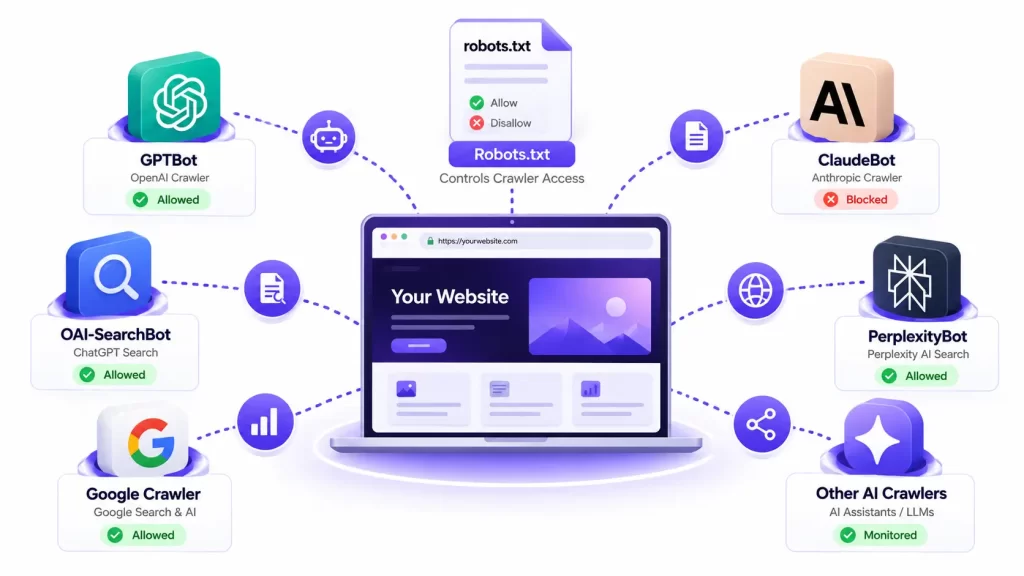
An AI crawler checker is a tool that analyzes a website’s crawler directives and shows how those rules affect recognized AI and search crawlers.
Most commonly, this means analyzing the website’s robots.txt file.
For example, a website might contain:
User-agent: GPTBot
Disallow: /
This directive tells GPTBot not to crawl the site’s URLs under the applicable rules.
Another website may have:
User-agent: OAI-SearchBot
Allow: /
That creates a different crawler policy.
The challenge is that robots.txt can contain multiple user-agent groups, wildcard rules and path-specific directives. A manual review can become confusing, particularly when a website has accumulated rules from SEO plugins, security systems or previous developers.
Nizwas’s AI Bot Crawler Checker turns this information into a more understandable report showing crawler status and relevant configuration. The tool currently presents recognized crawlers including ChatGPT/OpenAI-related crawlers, Claude, Perplexity and Google-related crawlers.
What does robots.txt actually do?
robots.txt is a standardized mechanism for communicating crawler access preferences.
The Internet Engineering Task Force formalized the Robots Exclusion Protocol in RFC 9309. Importantly, the specification explains that these rules are not an access-control or security mechanism. They are instructions that crawlers are requested to honor.
That means:
robots.txt ≠ firewall
robots.txt ≠ authentication
robots.txt ≠ complete website security
This is one of the most important concepts to understand before interpreting an AI crawler checker result.
Who Created the Nizwas AI Bot Crawler Checker?
The AI Bot Crawler Checker is a free website tool developed and provided by Nizwas IT Solutions as part of its Nizwas Tools collection.
Nizwas IT Solutions works across WordPress development, SEO, technical SEO, website performance, security and ongoing website maintenance. The company also develops practical tools intended to help website owners investigate common technical problems without requiring advanced development knowledge.
The checker was built around a straightforward problem:
Website owners should not have to manually decode complicated crawler directives just to understand which AI bots their website currently allows or blocks.
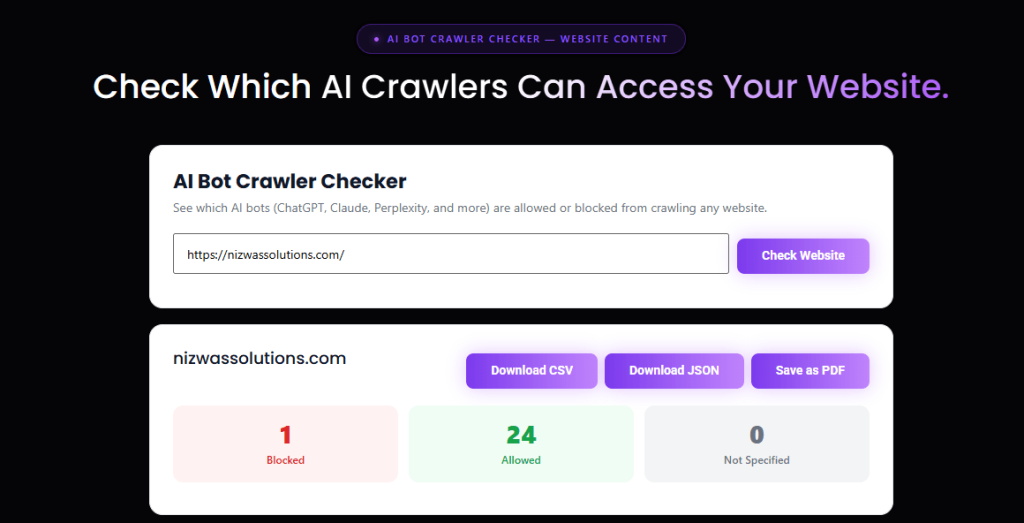
The tool page provides a URL input, crawler status results and export options, including CSV, JSON and PDF.
This makes it useful as a first-level technical diagnostic rather than treating AI visibility as a mysterious SEO metric.
What Will You Learn From an AI Crawler Checker?
Using an AI crawler checker can help you answer questions such as:
- Is an AI crawler explicitly blocked?
- Is access controlled through a wildcard
User-agent: *rule? - Is a specific crawler configured separately?
- Does the website have a Google-related crawler directive?
- Is ChatGPT search access configured?
- Is the website’s crawler configuration different from what you expected?
- Could an old robots.txt rule be affecting AI crawler access?
The result should then be combined with other technical checks.
For example, if the checker says a crawler is allowed but your server returns a 403, the problem may be outside robots.txt.
This is why an AI crawler checker should be considered a diagnostic starting point, not an AI visibility guarantee.
Quick Overview: What Does an AI Crawler Checker Actually Check?
| Check | What it tells you | What it does not tell you |
|---|---|---|
robots.txt | Crawler instructions | Whether every crawler obeys them |
| User-agent rules | Which crawler has specific instructions | Whether the server accepts its request |
| Allow/Disallow | Whether a path is permitted under the rules | Whether the page is useful enough to surface |
| AI crawler status | Configured access for supported bots | Whether AI systems will cite the page |
| Google-related rules | Certain Google crawler/product controls | Overall Google ranking |
| Search crawler access | Whether a search crawler is permitted | Search visibility or rankings |
| WAF/CDN | Requires separate investigation | Usually not represented by robots.txt |
Nizwas itself makes this distinction on the tool page: firewalls, CDNs, WAFs, authentication, bot protection and rate limits can affect crawler access independently of robots.txt.
Why Does AI Crawler Access Matter?
Search is no longer limited to traditional blue-link results.
Users increasingly ask questions through AI-powered search and answer interfaces. That makes technical accessibility an important part of a modern SEO strategy.
Google’s documentation says that existing SEO fundamentals continue to matter for its AI features, including ensuring crawling is allowed, making important content discoverable through internal links and making important content available in textual form.
OpenAI provides an especially useful example of why crawler names matter.
OpenAI currently distinguishes between several crawlers. OAI-SearchBot is used for search, while GPTBot is associated with crawling that may be used for training OpenAI’s foundation models. OpenAI states that these controls are independent.
So a website owner shouldn’t automatically assume:
“If I block GPTBot, ChatGPT search is blocked.”
Those are different controls.
This is exactly why simply searching a robots.txt file for the word “GPT” isn’t enough.
AI Crawlers Are Not All the Same
One of the biggest mistakes in AI SEO discussions is treating every bot as if it has the same purpose.
1. AI search crawlers
These crawlers can be associated with search or answer retrieval.
OpenAI’s OAI-SearchBot, for example, is specifically documented as being used to surface websites in ChatGPT search results. OpenAI says websites opting out of OAI-SearchBot will not be shown in ChatGPT search answers, although they can still appear as navigational links.
2. Training crawlers
Some crawlers are associated with collecting content that may be used for model training.
OpenAI documents GPTBot separately from OAI-SearchBot.
That distinction means a company may have different policies for different crawler categories.
3. Google-Extended
Google has another important example.
Google-Extended is not a separate HTTP crawler user-agent. Google explains that it is a robots.txt control token used to manage whether content Google crawls can be used for certain Gemini-related training and grounding purposes. Google also states that Google-Extended does not affect inclusion in Google Search and is not a Google Search ranking signal.
This is a crucial distinction.
Blocking Google-Extended does not mean:
“My website is blocked from Google.”
It controls a different aspect of how Google’s systems can use crawled content.
4. Anthropic crawlers
Anthropic also documents its crawler controls.
Anthropic says its bots respect robots.txt and provides a ClaudeBot directive for site owners who want to limit crawling.
The exact crawler ecosystem can change over time, which is another reason an AI crawler checker needs to keep its supported crawler definitions current.
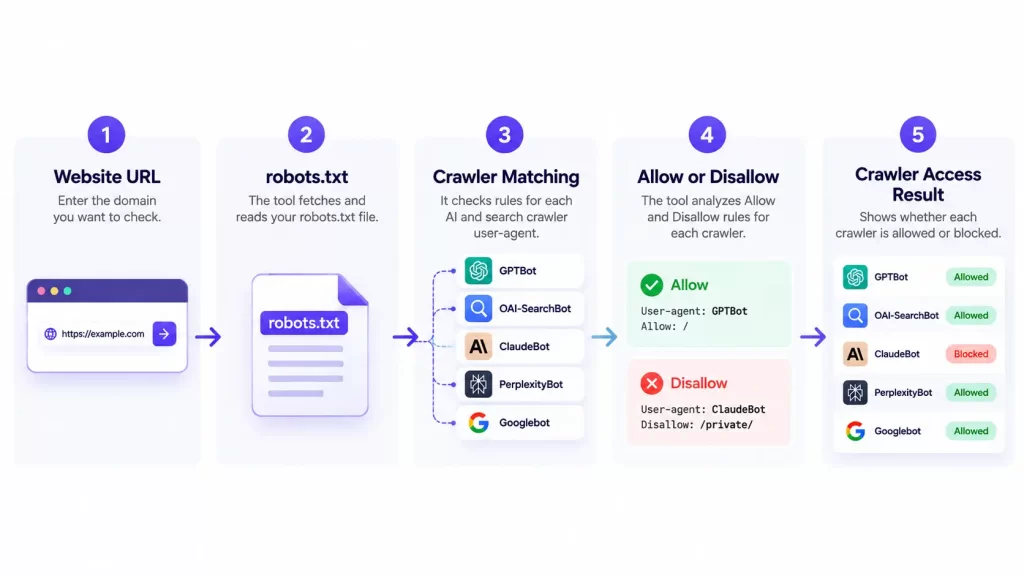
How Does an AI Crawler Checker Work?
A simplified process looks like this:
Website URL → robots.txt → crawler rules → user-agent matching → access result
Suppose your website has:
User-agent: *
Disallow: /private/
and:
User-agent: GPTBot
Allow: /
A checker can analyze the applicable rules for GPTBot and report the result.
The important part is that crawler rules are not always as simple as finding one line.
A robots.txt file can contain:
- wildcard user-agents
- bot-specific user-agents
AllowDisallow- path-specific rules
- multiple groups
- sitemap declarations
The Robots Exclusion Protocol defines the structure of these groups and rules.
Practical Example
Imagine a WordPress website has:
User-agent: *
Disallow: /
This is a very broad restriction.
Now imagine the owner adds:
User-agent: OAI-SearchBot
Allow: /
A crawler-aware checker needs to understand the relationship between the general and specific rules rather than simply declaring the website “blocked.”
This is where automated parsing is useful.
7 Critical Checks to Perform With an AI Crawler Checker
1. Check whether important AI search crawlers are blocked
Start with the crawlers associated with AI search and retrieval.
If your goal is to make publicly available content discoverable through an AI search system, a blocked search crawler deserves investigation.
For OpenAI, that means paying particular attention to OAI-SearchBot rather than looking only for GPTBot.
2. Check wildcard robots.txt rules
A wildcard rule such as:
User-agent: *
Disallow: /
can have a much wider impact than a bot-specific rule.
This is one reason a website can suddenly become difficult for multiple crawlers to access after a robots.txt change.
3. Check bot-specific rules
Look for dedicated entries such as:
User-agent: GPTBotUser-agent: OAI-SearchBotUser-agent: ClaudeBotand other supported crawler identifiers.
Do not assume that all of these bots have the same purpose.
4. Check Google-related directives carefully
If you see:
User-agent: Google-Extendeddo not interpret it as a standard Google Search crawler block.
Google explicitly says Google-Extended is a product control token and does not affect a site’s inclusion in Google Search.
5. Check whether robots.txt is only part of the problem
This is perhaps the most useful practical lesson.
Your AI crawler checker may say:
Allowed
But the crawler may still fail to retrieve the page.
Possible causes include:
- Cloudflare rules
- WAF policies
- server firewall rules
- bot protection
- CAPTCHA challenges
- authentication
- rate limiting
- HTTP errors
- DNS problems
- server downtime
Nizwas specifically highlights these limitations in its tool documentation.
6. Check the actual page
A robots.txt test doesn’t prove that every page is accessible.
After finding an important URL, test:
- HTTP response
- redirects
- HTTPS
- page availability
- authentication requirements
noindexX-Robots-Tag- canonical configuration
- readable HTML content
Google’s own crawling documentation distinguishes robots.txt from other crawling and indexing controls.
7. Recheck after making changes
Do not change robots.txt and assume everything is immediately resolved.
OpenAI notes that changes to robots.txt can take approximately 24 hours to adjust for its search crawler systems.
For other search systems and crawlers, timing can differ.
How to Use the Nizwas AI Bot Crawler Checker
Using the free Nizwas tool is straightforward.
Step 1: Open the checker
Go to the Nizwas AI Bot Crawler Checker.
Step 2: Enter your website
Enter the domain you want to investigate.
For example:
example.comStep 3: Run the check
The tool analyzes the site’s crawler configuration and presents the available crawler statuses.
Step 4: Review the results
Look for statuses such as:
- Allowed
- Blocked
- Not Specified
- Specific Rule / Configured
The Nizwas tool is designed to make these results easier to understand than manually interpreting a long robots.txt file.
Step 5: Investigate blocked crawlers
Do not immediately remove every Disallow.
First ask:
Why was this crawler blocked?
Your answer could depend on:
- content licensing preferences
- security requirements
- privacy considerations
- AI search strategy
- business goals
- website architecture
There is no universal requirement to allow every AI crawler.
Should You Allow Every AI Crawler?
Not necessarily.
This is an important point because AI SEO advice sometimes becomes overly simplistic.
Your crawler policy should reflect what you actually want.
For example:
| Situation | Possible consideration |
|---|---|
| Want AI search discovery | Review search crawler access |
| Concerned about training use | Review training-related crawler controls |
| Private content | Keep it behind proper access controls |
| Sensitive business information | Review exposure carefully |
| Public marketing content | Evaluate whether AI discovery supports your strategy |
| Frequently attacked WordPress site | Review WAF and bot-management policies |
The right decision depends on your content strategy and risk model.
An AI crawler checker should therefore help you understand your current configuration, not automatically tell you to open everything.
Common Mistakes to Avoid
Mistake 1: Confusing GPTBot with ChatGPT Search
OpenAI documents GPTBot and OAI-SearchBot for different purposes.
Always identify the crawler before changing the rule.
Mistake 2: Treating robots.txt as security
Robots.txt is not authentication.
The official Robots Exclusion Protocol explicitly states that its rules are not a form of access authorization.
Never use robots.txt as the only protection for confidential information.
Mistake 3: Assuming “Allowed” means “will rank”
An allowed crawler does not guarantee:
- indexing
- citations
- rankings
- AI mentions
- traffic
- conversions
Crawler access is only one technical prerequisite.
Mistake 4: Blocking Google-Extended and assuming Google Search is blocked
Google explicitly says Google-Extended does not affect Google Search inclusion or rankings.
Mistake 5: Ignoring Cloudflare or the WAF
A robots.txt test can be positive while the edge layer returns 403, challenges or rate limits.
If the result looks correct but the crawler still cannot retrieve content, investigate the server and security layer.
Mistake 6: Copying robots.txt rules from another website
Every website has different requirements.
A rule that makes sense for an ecommerce site, publisher or SaaS company may be inappropriate for a local service business.
Expert Tips for Better AI Crawler Management
Keep robots.txt intentional
Do not allow old plugins, copied templates or temporary development rules to become permanent production policies.
Review the file after:
- website migrations
- redesigns
- SEO plugin changes
- security changes
- CDN migrations
- staging-to-production deployments
Separate technical access from AI content strategy
First determine:
Can the crawler technically access the content?
Then consider:
Should I allow this particular crawler?
Then investigate:
Is the content actually useful and trustworthy enough to be surfaced?
Those are three different questions.
Make important content easy to discover
Google’s current AI-feature guidance recommends fundamentals such as crawlable pages, internal linking and content available in textual form.
For a business website, that means your important pages should not exist in isolation.
Connect:
- service pages
- location pages
- case studies
- guides
- supporting blog posts
- author/company information
- contact information
Do not create an AI-only SEO strategy
Traditional technical SEO still matters.
Your website needs:
- accessible pages
- useful content
- clear information architecture
- internal links
- reliable hosting
- good performance
- appropriate structured data
- strong technical foundations
Google specifically says existing SEO fundamentals continue to apply to its AI search features.
Key Takeaways
An Free AI crawler checker is useful because it turns an otherwise confusing technical file into a practical crawler-access report.
The most important lessons are:
robots.txtcontrols crawler access preferences; it is not a security system.- Different AI crawlers can have different purposes.
- GPTBot and OAI-SearchBot should not automatically be treated as the same thing.
- Google-Extended is a separate control from Google Search crawling.
- An “Allowed” result does not guarantee AI visibility or citations.
- WAFs, CDNs, firewalls and server errors can block crawlers even when robots.txt allows them.
- AI search visibility still depends on broader technical SEO and content quality.
The practical goal is not to make every crawler green.
The goal is to understand your crawler policy and make deliberate decisions about it.
Next Steps: Check Your Website for Free
If you have never checked your website’s AI crawler configuration, this is a useful technical SEO task to add to your website audit.
Start with your robots.txt configuration, identify unexpected restrictions and then investigate the server or WAF if the technical result does not match what you see in practice.
You can use the free Nizwas AI Bot Crawler Checker to perform the initial check without manually interpreting every crawler directive.
If the checker identifies an issue, treat the result as the beginning of the investigation not the end.
For more complex WordPress websites, crawler access can intersect with technical SEO, Cloudflare, security configuration, caching, server rules and website architecture. That is where a broader technical review becomes useful.
Frequently Asked Questions
An AI crawler checker analyzes a website’s crawler configuration, typically its robots.txt, and reports whether supported AI or search crawlers are allowed, blocked or affected by specific rules.
Yes. The Nizwas AI Bot Crawler Checker is available as a free tool on the Nizwas website.
It can help determine whether the relevant OpenAI crawler is permitted by your robots.txt configuration. However, this does not guarantee that ChatGPT will surface or cite your website. OpenAI distinguishes its search crawler, OAI-SearchBot, from GPTBot and other user agents.
No. Robots.txt is only one layer. WAF rules, CDNs, firewalls, authentication, rate limiting and server errors can also affect whether a crawler can retrieve a page.
Not necessarily. The appropriate policy depends on your content strategy, security requirements and preferences concerning AI search and model training.
OpenAI documents GPTBot for crawling that may be used to improve its foundation models, while OAI-SearchBot is used to surface websites in ChatGPT search results. OpenAI states that these controls are independent.
No. Google says Google-Extended does not affect a site’s inclusion in Google Search and is not a Google Search ranking signal.
No. Allowing a crawler only addresses technical accessibility. AI systems use additional signals and processes when deciding which content to surface.
Final Thoughts
An AI crawler checker gives website owners a practical way to understand an increasingly important part of technical SEO.
But the most useful result isn’t simply seeing a green or red status.
It is understanding why a crawler is allowed or blocked, what that crawler is actually used for, and whether the result matches your business’s content strategy.
Start with robots.txt. Then investigate your server, CDN and WAF configuration. Finally, look at the quality, structure and discoverability of the content itself.
That approach gives you a much more accurate picture of AI search readiness than treating crawler access as a ranking score.
And if you want to start with a simple technical check, the Nizwas IT Solutions AI Bot Crawler Checker is free to use.