
Google Business Profile Optimization: The Complete 2026 Guide
If someone searches for your business on Google today, what do they see?
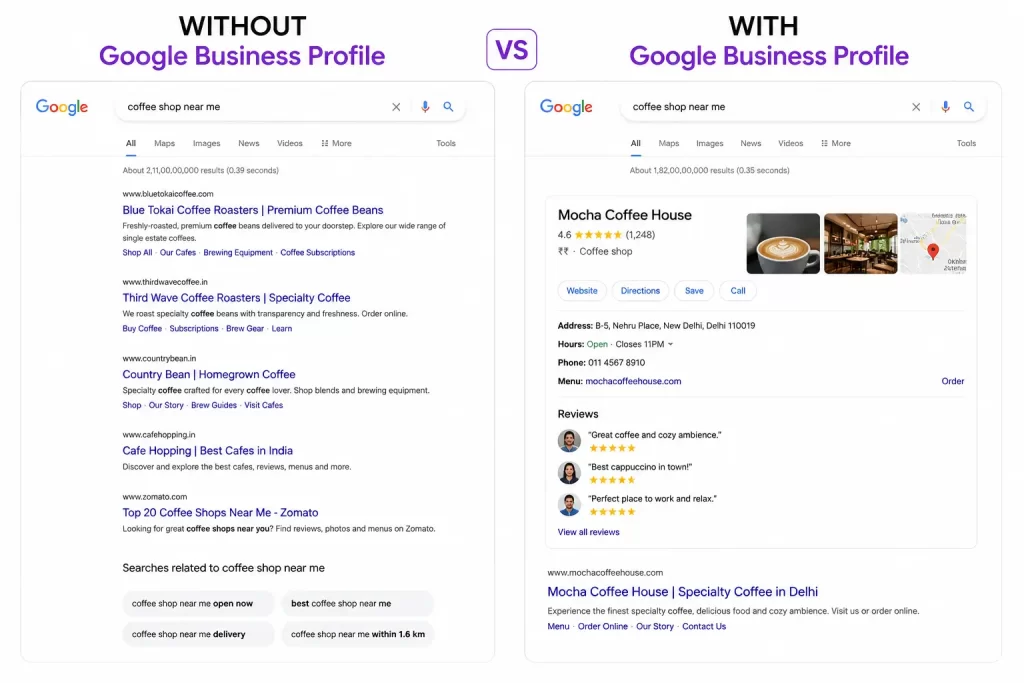
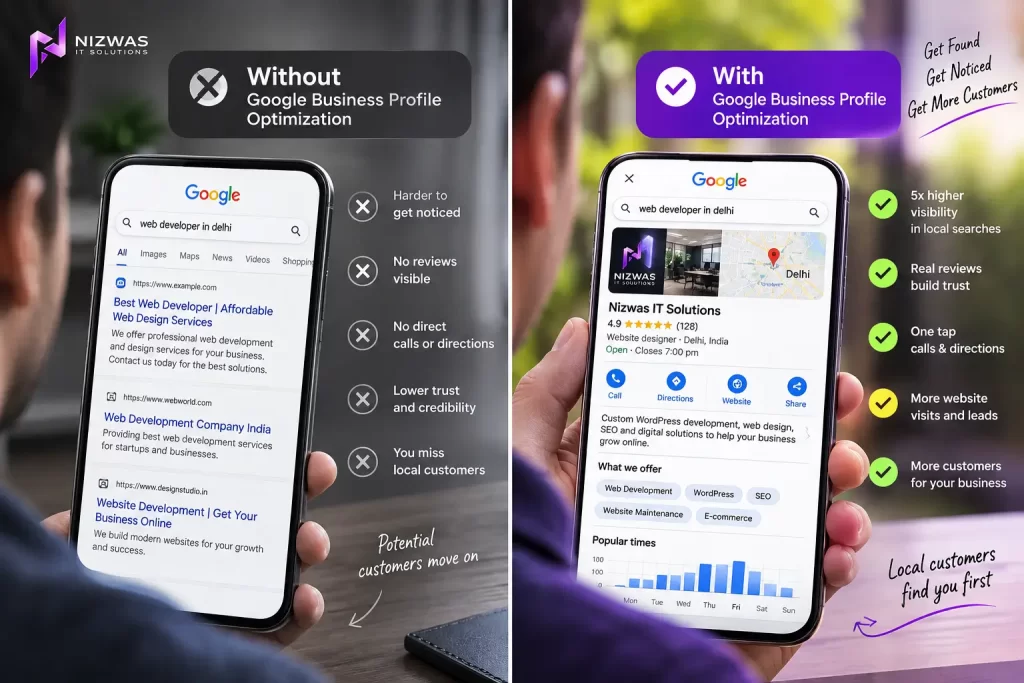
They may see your website. They may see reviews. They may see photographs, opening hours, services, a phone number, directions and a map listing, sometimes before they ever visit your website.
That listing is your Google Business Profile (GBP).
For a local business, it is not simply another online directory entry. It is one of the main places where potential customers decide whether to call, visit, book or move on to a competitor.
Google Business Profile is free and allows eligible businesses to manage how they appear across Google Search and Google Maps. Businesses can provide information such as opening hours, website, phone number, location, photos, services and reviews.
But creating a profile is only the beginning.
An incomplete profile, the wrong category, outdated information, weak photographs or poorly managed reviews can make an otherwise good business look less trustworthy.
This guide explains how to approach Google Business Profile optimization in 2026, what actually deserves your attention, what mistakes to avoid and how to turn your profile into a useful local marketing asset.
Part 1: Understand What Google Business Profile Actually Does
Before changing anything, it helps to understand what you are optimizing.
What is Google Business Profile?
Google Business Profile is Google’s system for managing a business’s presence on Google Search and Maps.
When somebody searches for a local business or service, Google may display a local result containing information about businesses that match the search.
Depending on the search, a customer may see:
- Business name
- Category
- Address
- Service area
- Phone number
- Website
- Opening hours
- Reviews
- Photos
- Services
- Products
- Questions and answers
- Directions
- Booking options
- Other business attributes
This makes GBP different from a traditional webpage.
Your website is something you control directly.
Your Google Business Profile is a public business entity that Google uses to help customers discover and evaluate you.
Google says local visibility is influenced by factors including relevance, distance and prominence. That means simply filling every field with keywords does not guarantee a top position.
The better approach is to make your business information accurate, complete and genuinely useful.
Why Google Business Profile matters for local businesses
Imagine someone needs an emergency plumber.
They are unlikely to begin by reading ten pages about plumbing.
They may search:
emergency plumber near me
or:
plumber in [city]
The first thing they see could be a local result with several businesses.
They can compare ratings, reviews, opening hours, location and other information without visiting every website.
The same principle applies to:
- Dentists
- Restaurants
- Electricians
- Roofing companies
- Car repair shops
- Real estate agencies
- Healthcare providers
- Salons
- Hotels
- Contractors
- Local retailers
- Professional service companies
For these businesses, Google Maps visibility can have a direct relationship with customer acquisition.
Is Google Business Profile useful for every business?
No.
Google says Business Profiles are intended for businesses that interact with customers in person during stated business hours, including storefront businesses and service providers who visit customers. Online-only businesses generally aren’t eligible.
This distinction is important.
If your business is completely online, creating a fake physical location just to obtain a Google Business Profile is not a legitimate SEO strategy.
Google Business Profile is not a shortcut
There is a common misconception that optimizing a profile means adding keywords everywhere.
It doesn’t.
A better profile is one that helps Google and customers understand:
Who you are.
What you offer.
Where you operate.
Why customers should trust you.
That is the foundation of effective GBP optimization.
Part 2: Optimize the Core Information Correctly
The first optimization stage is also the easiest to get wrong.
1. Use your real business name
Your business name should match the name your business actually uses in the real world.
For example, if the company’s real name is:
Nizwas IT Solutions
do not change it to:
Nizwas IT Solutions – Best WordPress Development Company in Delhi
just because you want to rank for WordPress development.
Google’s guidelines specifically state that the business name should represent the real-world name. Adding unnecessary information such as extra keywords, locations or promotional text can violate the guidelines and potentially lead to profile restrictions.
This is one of the most important rules in Google Business Profile optimization.
Do not turn your business name into a keyword field.
2. Choose the correct primary category
Your primary category tells Google what type of business you operate.
This can influence which searches your business is considered relevant for.
Choose the category that most accurately represents your core business.
For example, a restaurant should select the appropriate restaurant category rather than choosing an unrelated category simply because it appears popular.
The same applies to:
- Contractors
- Medical practices
- Marketing agencies
- Auto repair businesses
- Hotels
- Retail stores
- Professional services
Don’t choose a category because it contains your favorite keyword.
Choose it because it describes your business.
3. Add relevant secondary categories
If Google provides appropriate additional categories for your business, use them.
But don’t add every remotely related category.
A business that offers web development and SEO services should not select unrelated categories just to increase its potential visibility.
Relevance is more important than quantity.
Keyword research around GBP categories is also worth doing. A 2026 Ahrefs-based dataset reports approximately 150 US monthly searches for “Google Business Profile categories”, with a reported keyword difficulty of 23, while “Google Business Profile description” is reported at approximately 80 monthly searches with a difficulty of 11.
These are excellent supporting topics for a local SEO content strategy because they address specific problems business owners actually encounter.
4. Complete your business information
Google recommends providing as much complete and accurate business information as possible.
Depending on the business, this includes:
- Address
- Opening hours
- Phone number
- Website
- Business category
- Attributes
- Service area
Complete information helps customers understand what you do, where you are and when they can visit.
Don’t leave important fields blank simply because they seem optional.
5. Set the correct service area
This is especially important for plumbers, electricians, cleaners, contractors, mobile mechanics and other service-area businesses.
If customers do not visit your business address, Google allows eligible service-area businesses to specify where they serve customers.
Google currently allows service areas to be defined using cities, postal codes or other areas, with up to 20 service areas. It does not allow a new service area to be defined simply as a radius around the business.
More importantly, choose areas you actually serve.
Don’t add every major city within 100 miles just because you want more visibility.
Google’s guidelines say service-area businesses should have one profile for the central office or location with a designated service area, rather than creating fake profiles for different cities.
6. Write a useful business description
Your business description is an opportunity to explain what you actually do.
A good description should answer:
- What does the business offer?
- Who does it serve?
- Where does it operate?
- What makes it different?
- What experience does it have?
For example:
Nizwas IT Solutions provides WordPress website development, WooCommerce development, website maintenance and performance optimization for small and growing businesses.
That’s clear.
Avoid writing something like:
Best WordPress company | Best website development | Best SEO company | Affordable web design | WordPress developer near me…
It reads like an advertisement written for an algorithm.
Google’s guidelines say the description should provide useful information about services, products, mission or history, and should not contain irrelevant content, gimmicky text or promotional sales language. Links are also not allowed in the description field.
7. Keep phone numbers and website details accurate
Your profile should send customers to the correct business contact information.
Check your:
- Phone number
- Website
- Booking URL
- Contact information
- Address
- Hours
after any business change.
A ranking is not useful if customers cannot reach you.
Part 3: Build Trust With Photos, Services and Reviews
Getting visibility is only half the job.
The next question is:
Why should somebody choose you?
Your profile needs to answer that question visually and through customer feedback.
8. Add real business photographs
Google allows businesses to add photos and videos showing their business and products or services.
For a local business, real photographs are often much more convincing than generic stock images.
Depending on the industry, consider adding:
- Exterior photographs
- Interior photographs
- Team photographs
- Products
- Completed projects
- Equipment
- Vehicles
- Work in progress
- Before-and-after images
- Office photographs
- Customer-facing areas
A roofing company can show completed roofs.
A restaurant can show actual dishes and the dining environment.
A web agency can show real projects and team members.
The objective is simple:
Show customers that the business is real.
9. Keep photographs current
A business profile that hasn’t changed for several years can look neglected.
That does not mean you need to upload photographs every day.
Instead, update the profile naturally when you have something worth showing.
New project?
Add it.
Renovated office?
Add it.
New product?
Add it.
Seasonal service?
Show it.
Google also allows customers to contribute photo updates, so businesses should monitor how their profile appears from a customer’s perspective.
10. Add your services
Your services section should reflect what you genuinely sell.
For example, a digital agency might list:
- WordPress website development
- WooCommerce development
- Website maintenance
- WordPress security
- Website speed optimization
- Technical SEO
A plumber might list:
- Emergency plumbing
- Drain cleaning
- Leak detection
- Water heater repair
- Pipe repair
Don’t create services solely because they contain popular keywords.
The service should actually exist.
11. Develop a genuine review process
Reviews are one of the most visible trust signals on a Google Business Profile.
But the goal shouldn’t be:
Get 500 five-star reviews as quickly as possible.
The goal should be:
Consistently create great customer experiences and make it easy for genuine customers to leave honest feedback.
Google explicitly allows businesses to ask customers for reviews using a review link or QR code. However, offering incentives in exchange for reviews or asking customers to change or remove negative reviews is prohibited.
A simple process works well:
Complete the job → confirm customer satisfaction → send review request → thank customer.
12. Don’t buy reviews
Buying reviews can create serious reputation and policy problems.
Avoid:
- Purchased Google reviews
- Fake customer accounts
- Review exchange schemes
- Incentivized five-star reviews
- Employees reviewing their own business
- Asking only happy customers to leave reviews while suppressing unhappy ones
Authenticity matters.
13. Respond to reviews
A review isn’t the end of the conversation.
Your response is public.
It can also demonstrate how your company communicates with customers.
For a positive review:
Thanks, Sarah. We’re glad the team could complete the website migration without disrupting your business. We appreciate you taking the time to share your experience.
For a negative review:
We’re sorry the experience did not meet your expectations. We’d appreciate the opportunity to understand what happened and resolve the issue. Please contact our team directly so we can look into it.
Google recommends keeping review responses professional, relevant and helpful, while avoiding personal attacks or exposing private information.
You don’t need a long response to every review.
You need a genuine one.
Part 4: Connect Your Google Business Profile With Your Website and Local SEO
A strong Google Business Profile shouldn’t exist in isolation.
Your website and other online references should reinforce the same business information.
14. Keep your business information consistent
Check your:
- Website
- Google Business Profile
- Bing
- Apple Maps
- Social profiles
- Industry directories
- Local directories
- Chamber listings
- Professional associations
Make sure your business name, address and phone information are accurate wherever they appear.
If an old address is still appearing on major websites, update it.
15. Create a strong local landing page
Your website should clearly explain the services you offer and the locations you serve.
For example:
could explain:
- Services
- Industries served
- Process
- Projects
- Testimonials
- Areas served
- Contact options
Don’t create dozens of pages that differ only because the city name has changed.
If you create location pages, make them genuinely useful.
16. Connect services with locations naturally
Suppose you are a plumbing company serving Manchester.
Instead of repeating:
plumber Manchester
best plumber Manchester
plumbing Manchester
plumbing services Manchester
write naturally:
We provide emergency plumbing, leak detection and water heater repairs for homeowners throughout Manchester and surrounding areas.
One sentence communicates the same information without sounding artificial.
17. Use internal links
Your website should have a logical structure.
For example:
Homepage → Services → Individual Service → Location → Contact
Internal links help visitors discover relevant information and help search engines understand relationships between your pages.
18. Add appropriate LocalBusiness structured data
Structured data can help Google understand information about your business.
Google Search Central documents LocalBusiness structured data for information such as business details, opening hours and other supported properties.
Depending on your business, structured data may include information such as:
- Business name
- Address
- Telephone
- URL
- Opening hours
- Location
- Other supported business details
But remember:
Schema is not a magic ranking button.
It should accurately represent information already present on the page.
19. Improve your website experience
Imagine someone finds your business through Google Maps and clicks your website.
If the website:
- Takes too long to load
- Doesn’t work on mobile
- Has a confusing navigation
- Hides the phone number
- Has broken forms
- Doesn’t explain services
- Looks outdated
you may lose the customer even after winning the search.
Local SEO and conversion optimization need to work together.
20. Earn relevant local authority
Your website can become more credible through genuine local relationships.
Consider:
- Local business organizations
- Industry associations
- Community events
- Local publications
- Partnerships
- Sponsorships
- Local case studies
- Business interviews
Don’t chase hundreds of random backlinks.
One relevant local mention from a respected organization can make much more sense than dozens of unrelated links.
Part 5: Measure, Maintain and Improve Your Profile
The biggest mistake businesses make with Google Business Profile is treating optimization as a one-time project.
It isn’t.
Your business changes.
Your customers change.
Your competitors change.
Your profile should evolve with them.
21. Monitor your profile regularly
Create a monthly GBP review.
Check:
- Business name
- Category
- Address
- Phone
- Website
- Hours
- Services
- Photos
- Reviews
- Questions
- Business attributes
- Service area
Google provides tools for owners and managers to handle profile information, posts, reviews, photos and other activities.
22. Watch for incorrect edits
Google and users can contribute information to business profiles.
That means you should occasionally inspect your listing.
Look for:
- Incorrect hours
- Wrong phone number
- Incorrect address
- Wrong category
- Duplicate listings
- Unexpected changes
- Inappropriate photographs
Don’t assume your profile will always remain exactly as you left it.
23. Track customer actions
Don’t judge your GBP only by its position on Maps.
Look at what customers actually do.
Depending on the available reporting, useful business outcomes include:
- Website visits
- Calls
- Direction requests
- Booking actions
- Messages
- Customer inquiries
- Leads
- Sales
A profile ranking number is useful, but revenue is more useful.
24. Track local search visibility
You can monitor important service-and-location searches such as:
dentist in [city]
plumber near me
WordPress developer [city]
roofing contractor [city]
emergency electrician [city]
But don’t expect one search performed from one location to represent your entire local ranking.
Local results can vary depending on the searcher’s location and other context.
This is why a broader local SEO measurement system is more useful than checking your own ranking from the office once a month.
25. Review competitors
Look at businesses that consistently appear in the local results.
Don’t copy them.
Study them.
Ask:
- What categories are they using?
- What services do they list?
- How many reviews do they have?
- What do customers mention?
- What types of photographs do they use?
- What does their website do better?
- What information is missing from our profile?
The goal is to identify gaps.
26. Improve based on customer questions
Your customers can tell you what information is missing.
If people repeatedly ask:
Do you provide emergency service?
add the answer.
If they ask:
Do you serve this neighborhood?
make the service area clearer.
If they ask:
How much does this service cost?
consider creating useful pricing guidance on your website where appropriate.
Good local SEO often starts with good customer service.
27. Be careful with third-party GBP management
If you hire an agency or freelancer, make sure the business retains control of its profile.
Google provides owner and manager roles so businesses can give others access without sharing passwords.
This is a much safer approach.
Your business should know:
- Who owns the profile
- Who manages it
- What changes are being made
- Where review requests are coming from
- What reports are being provided
- What access the agency has
Don’t allow a marketing provider to make your business dependent on an account you don’t control.
The 2026 Google Business Profile Optimization Checklist
Use this checklist before considering your profile finished:
Business Information
- Business name matches the real-world business name
- Correct primary category selected
- Relevant secondary categories added
- Accurate phone number
- Correct website
- Accurate business hours
- Special hours updated
- Correct physical address or service area
- Business description completed
- Relevant attributes added
Services
- Main services listed
- Service descriptions are accurate
- No irrelevant services
- Website has corresponding service pages
Photos
- Logo uploaded
- Cover image uploaded
- Exterior photographs
- Interior photographs where applicable
- Team photographs
- Product/service photographs
- Recent project photographs
- Outdated images reviewed
Reviews
- Genuine review process established
- Review link available
- Customers can easily leave feedback
- Reviews answered appropriately
- Negative reviews handled professionally
- No purchased or incentivized reviews
Website
- Mobile-friendly
- Fast-loading
- Clear service pages
- Location information
- Contact information
- Internal links
- LocalBusiness structured data where appropriate
- Search Console configured
- Analytics configured
Local SEO
- NAP information checked
- Important local directories updated
- Relevant local citations
- Relevant local backlinks
- Local content strategy
- Competitor analysis
- Local rankings tracked
- Leads tracked
Common Google Business Profile Mistakes to Avoid
Keyword stuffing the business name
This is one of the most dangerous shortcuts.
Use your actual business name.
Creating fake locations
Don’t create profiles for cities where you don’t have legitimate eligible locations.
Buying reviews
Don’t do it.
Build a real review process instead.
Creating duplicate profiles
Multiple profiles for the same eligible location can create confusion and policy issues.
Using fake addresses
A virtual office or mailbox does not automatically make a business eligible for a storefront profile.
Adding irrelevant categories
More categories do not automatically mean more visibility.
Publishing meaningless posts
Don’t publish content just to say you posted.
Ignoring negative reviews
A negative review isn’t necessarily the end of the world.
Ignoring it can be worse.
Treating GBP as a one-time setup
Businesses change.
Keep your profile updated.
Final Thoughts
Google Business Profile optimization in 2026 is not about finding one hidden ranking trick.
It is about building a clear, accurate and trustworthy representation of your business.
Start with the basics:
Correct business information.
Then build relevance:
Right category + right services + useful website content.
Then build trust:
Real photographs + genuine reviews + professional responses.
Then build authority:
Relevant local mentions + useful content + strong website.
Finally, measure the outcome:
Calls + inquiries + bookings + customers.
Google itself emphasizes complete and accurate business information, customer reviews, photographs and other profile details as part of maintaining a useful Business Profile.
The businesses that benefit most from Google Business Profile are usually not the ones looking for shortcuts.
They are the ones that consistently give Google accurate information and give customers a reason to choose them.
That is the real goal of GBP optimization:
Be easier to find.
Be easier to trust.
Be easier to contact.
And ultimately, turn local search visibility into real business.
Frequently Asked Questions
1. What is Google Business Profile optimization?
Google Business Profile optimization is the process of improving and maintaining a business’s Google listing so that its information is accurate, complete, relevant and useful to potential customers.
2. Is Google Business Profile free?
Yes. Google provides Business Profile at no charge for eligible businesses. It allows businesses to manage how they appear across Google Search and Google Maps.
3. How do I optimize my Google Business Profile?
Start by using your real business name, selecting the correct category, completing your business information, adding accurate services, setting the correct service area, uploading genuine photographs, earning authentic reviews and keeping the profile updated.
4. Does adding keywords to my Google Business Profile name help rankings?
You should not add keywords to your business name unless those words are genuinely part of the real-world business name. Google requires business names to accurately represent the business and warns against unnecessary information in the name.
5. How important are Google Business Profile categories?
Categories help Google understand what type of business you operate and are an important part of profile relevance. Choose the most accurate primary category and only add relevant secondary categories.
6. How many photos should I add to my Google Business Profile?
There is no universal number that guarantees better rankings. Focus on useful, high-quality and genuine photographs that show your business, products, services, team or completed work.
7. How do I get more Google reviews?
Provide excellent service and make it easy for genuine customers to leave feedback. Google allows businesses to request reviews through a review link or QR code, but businesses should not offer incentives in exchange for reviews.
8. Should I respond to every Google review?
Responding appropriately to reviews is a good business practice. Keep responses professional, relevant and genuine. For negative reviews, avoid arguments and never disclose private customer information.
9. Can service-area businesses use Google Business Profile?
Yes. Eligible service-area businesses can use a Business Profile and specify the areas they serve. Google currently allows up to 20 service areas based on cities, postal codes or other areas.
10. Can I create a Google Business Profile for every city I serve?
Not simply because you serve those cities. Service-area businesses generally should use one profile for the business location and define the service area rather than creating fake city-specific profiles.
11. Does Google Business Profile help with Google Maps SEO?
Yes. Business Profile is the system businesses use to manage their presence on Google Maps and Search. Accurate and complete information can help Google understand the business and help customers find it.
12. Does posting on Google Business Profile improve rankings?
Posts can help communicate updates, products, services and other useful information to customers, but there is no legitimate guarantee that posting every day will make a profile rank higher. Focus on useful information rather than posting simply for frequency.
13. Does website SEO still matter if I have an optimized Google Business Profile?
Absolutely. Your Business Profile and website serve different purposes. A strong website supports your local relevance, provides detailed service information and gives customers somewhere to learn more and convert.
14. Does schema markup improve Google Business Profile rankings?
Schema helps search engines understand information on your website, but it should not be treated as a guaranteed Google Business Profile ranking factor. Google supports LocalBusiness structured data for eligible business information.
15. How long does Google Business Profile optimization take to work?
There is no guaranteed timeframe. Local visibility depends on factors such as relevance, distance, prominence, competition, business history and the quality of your overall local presence.
16. Can an SEO agency manage my Google Business Profile?
Yes. Google provides owner and manager access so businesses can give trusted third parties access without sharing passwords. However, the business should retain appropriate ownership and control of its profile.