
Dental website cost can range from a few hundred dollars to $25,000 or more in the United States, depending on what the website needs to do.
That wide range can make choosing a web developer surprisingly difficult.
One company may offer a dental website for $1,500. Another may quote $6,000. A dental marketing agency may propose $15,000 or more.
Are they all selling the same thing?
Usually, no.
A basic website that lists a dentist’s services, address, phone number and opening hours is very different from a custom website with treatment pages, online appointment scheduling, patient forms, integrations, professional photography, local SEO and multiple location pages.
The American Dental Association notes that basic customized dental websites can cost about $6,000, while high-end websites with additional features can reach $25,000. Current 2026 industry pricing guides also show a wide range depending on the build method and functionality.
The important question isn’t simply, “How much does a dental website cost?”
It’s:
What are you getting for that investment, and does the website support the way your practice actually acquires patients?
This guide breaks down the real costs, the features that influence pricing, ongoing expenses, healthcare-specific considerations, and the questions you should ask before signing a website development contract.
Who Wrote This Guide?
This guide was prepared by the Nizwas IT Solutions content and web-development team, based on current 2026 market research, published dental website pricing information, official American Dental Association guidance, U.S. Department of Health and Human Services resources, and current Google Search guidance.
Nizwas IT Solutions works with WordPress websites, website development, SEO, performance optimization, maintenance and security.
The purpose of this article is not to tell every dental practice to spend a particular amount. It is to give practice owners a framework for comparing proposals intelligently.
What Will You Learn?
By the end of this guide, you should understand:
- Typical dental website cost ranges in the USA
- Why dental website quotes vary so much
- What a basic dental website should include
- What increases development costs
- How online booking affects the budget
- Why treatment pages matter
- What to consider when collecting patient information
- How SEO fits into the website budget
- What hosting and maintenance can cost
- What questions to ask a web developer
- How to compare two website proposals fairly
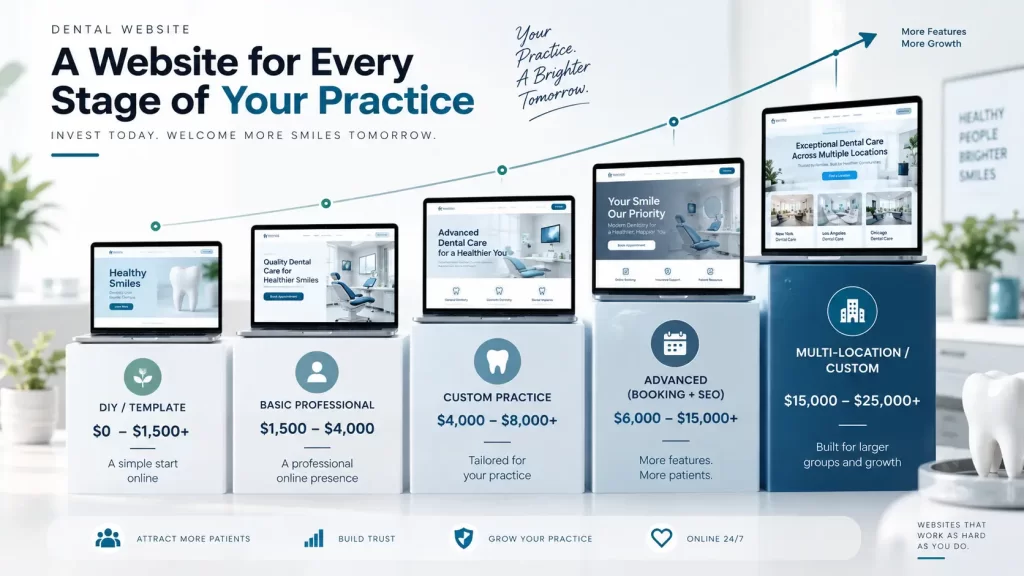
Quick Overview: Dental Website Cost in the USA
There is no single standard price for a dental website.
A useful planning framework for 2026 looks like this:
| Website type | Approximate project range | Typical use |
|---|---|---|
| DIY/template website | $0–$1,500+ | Very small or temporary presence |
| Basic professional website | $1,500–$4,000 | Small single-location practice |
| Custom practice website | $4,000–$8,000+ | Established dental practice |
| Custom website with booking, SEO and advanced features | $6,000–$15,000+ | Competitive practices |
| Advanced/multi-location website | $15,000–$25,000+ | Larger groups and complex requirements |
These are planning ranges, not fixed market prices.
Published 2026 sources vary considerably, which is exactly why dental practices should compare the scope behind a quote rather than comparing the headline number alone. The ADA’s own guidance gives a useful benchmark of around $6,000 for a basic customized dental website and up to $25,000 for higher-end sites with additional features.
What Is a Dental Website Cost?
The phrase “dental website cost” usually refers to the amount a practice spends to plan, design, develop, launch and maintain its website.
But a website project can contain many different components:
- Strategy and planning
- UX and visual design
- WordPress development
- Website content
- Treatment/service pages
- Doctor profiles
- Location pages
- Online appointment scheduling
- Contact forms
- Patient intake workflows
- SEO
- Analytics
- Hosting
- Security
- Accessibility
- Maintenance
- Third-party integrations
That is why two websites with the same number of pages can have completely different prices.
For example, a five-page website with a template and a contact form is relatively straightforward.
A five-page website connected to a scheduling platform, CRM, analytics system, patient communication platform and custom design is a completely different project.
Why Does Dental Website Cost Matter?
For a dental practice, the website is often part of the first interaction a prospective patient has with the business.
A visitor may be comparing several practices before deciding whom to contact.
They may want to know:
- Where is the office?
- What treatments are available?
- Does the dentist treat children?
- Does the practice offer implants?
- Does the practice accept my insurance?
- Can I request an appointment online?
- What does the office look like?
- Who are the dentists?
- What do other patients say?
- Is this practice appropriate for my needs?
A website that answers these questions clearly can be more useful than a website that simply looks attractive.
The American Dental Association similarly advises practices to design their websites around prospective and current patients rather than around the preferences of dentists or developers.
7 Major Factors That Influence Dental Website Cost
1. Template vs. Custom Design
This is one of the first decisions affecting the budget.
A template-based website starts with an existing design and modifies elements such as:
- Logo
- Colors
- Fonts
- Images
- Content
- Buttons
- Navigation
A custom website starts with the practice’s goals, brand, audience and user journey.
Custom design generally requires more planning and design time, so it costs more.
That doesn’t mean every practice needs an expensive custom website.
A new practice with a limited budget may be perfectly well served by a carefully customized template.
An established cosmetic dentistry practice competing in a major market may have different requirements.
The question should be:
Does the design approach fit the practice’s marketing goals?
2. Number and Depth of Treatment Pages
This is an area where many website proposals become misleading.
A website with:
- Home
- About
- Services
- Contact
- Blog
may look complete on paper.
But a dental practice may offer:
- General dentistry
- Dental implants
- Invisalign
- Cosmetic dentistry
- Teeth whitening
- Veneers
- Root canal treatment
- Emergency dentistry
- Pediatric dentistry
- Dental crowns
- Dentures
Each important service may deserve its own useful page.
A treatment page shouldn’t simply contain 200 words and a stock photograph.
It should answer the questions a potential patient actually has.
For example, an implant page might explain:
- Who may need implants
- What the process involves
- What patients should discuss with the dentist
- Common questions
- What makes the practice’s approach different
- How to request a consultation
More useful content requires more strategy, writing, design and development time.
3. Online Appointment Scheduling
Appointment functionality can range from a simple external booking link to a much more integrated scheduling experience.
A basic approach may simply send visitors to an existing scheduling system.
A more advanced implementation might involve:
- Appointment types
- Provider selection
- Location selection
- Availability
- Confirmation emails
- Reminder systems
- New-patient forms
- Practice-management software integration
The more systems involved, the more development and testing may be required.
Online booking should therefore be evaluated as both a website feature and a recurring software expense.
4. SEO and Local Search
A dental website isn’t particularly useful if prospective patients cannot find it.
SEO can include:
- Keyword research
- Page architecture
- Treatment pages
- Location pages
- Internal linking
- Metadata
- Schema markup
- XML sitemap
- Technical SEO
- Image optimization
- Local SEO
- Google Business Profile support
- Content strategy
- Performance optimization
Google’s current guidance emphasizes helpful, reliable, people-first content rather than content created primarily to manipulate search rankings. It also recommends making it clear who created content and demonstrating first-hand expertise where appropriate.
For a dental practice, that means a page about dental implants should ideally provide genuinely useful information rather than simply repeating a keyword dozens of times.
SEO should be considered during website planning rather than added after the website is finished.
5. Professional Photography and Video
Photography can make a surprisingly large difference to a dental website.
Compare:
Option A
Generic stock photo of a smiling person in a dental chair.
Option B
Professional photographs of:
- The actual dentist
- Reception area
- Treatment rooms
- Staff
- Equipment
- Exterior
- Team interaction
The second option gives prospective patients a better sense of the actual practice.
If professional photography or video is included, it can increase the overall project budget.
It can also make the website more authentic.
6. Healthcare Privacy and Security
Dental websites require additional care when they collect patient information.
A basic contact form asking for a name and general enquiry is not necessarily equivalent to a form collecting detailed health information.
HIPAA applies to covered entities and business associates under the circumstances defined by the law. HHS identifies dentists among healthcare providers that can fall within the definition of a covered entity.
HHS has also issued specific guidance about online tracking technologies used by HIPAA-regulated entities because information collected through websites or apps can raise privacy concerns depending on the circumstances.
That means a dental practice should not simply ask a developer:
“Is this website HIPAA compliant?”
Instead, ask:
- What information will the website collect?
- Where will submitted information be stored?
- Who can access it?
- Which third-party services receive it?
- Does the vendor require a Business Associate Agreement where applicable?
- How is the information protected?
- What tracking technologies are installed?
- Is the appointment system handling sensitive information outside the website?
The American Dental Association also advises practices to address patient information protection, encryption, vendor responsibilities and Business Associate Agreements where applicable.
This article is not legal advice. A practice should obtain appropriate legal or compliance advice for its specific circumstances.
7. Ongoing Maintenance
Launching the website is not the end of the project.
A WordPress dental website may require:
- WordPress updates
- Plugin updates
- Theme updates
- Security monitoring
- Backups
- Malware monitoring
- Performance checks
- Broken-link checks
- SSL monitoring
- Form testing
- Compatibility testing
A practice should ask whether these services are included in the initial project or charged separately.
Dental Website Cost by Project Type
Basic Dental Website
A basic professional site may include:
- Homepage
- About the practice
- Services
- Contact
- Location
- Doctor profile
- Contact form
- Mobile responsive design
This can work well for a new or very small practice.
The main goal is credibility and accessibility rather than building a large marketing platform.
Professional Dental Practice Website
An established practice may need:
- Custom branding
- Multiple treatment pages
- Doctor profiles
- Patient testimonials
- FAQ content
- Online appointment requests
- Local SEO foundations
- Analytics
- Conversion-focused calls to action
- Performance optimization
This is where many practices will fall into the several-thousand-dollar project range.
Advanced Dental Website
An advanced project could include:
- Online booking
- Multiple providers
- Multiple locations
- Extensive treatment content
- CRM integration
- Practice-management integrations
- Advanced forms
- Marketing automation
- Custom functionality
- Advanced SEO
- Custom reporting
These projects can move into five-figure budgets.
What Should Be Included in a Dental Website Quote?
Never compare proposals based only on the total price.
Instead, create a comparison table.
| Requirement | Vendor A | Vendor B | Vendor C |
|---|---|---|---|
| Custom design | ✓ | ✓ | ? |
| Number of pages | 10 | 20 | 6 |
| Treatment pages | ✓ | ✓ | ? |
| SEO setup | Basic | Advanced | Basic |
| Online booking | Extra | Included | Extra |
| Photography | No | Yes | No |
| Hosting | 1 year | Monthly | Extra |
| Maintenance | Extra | Included | Extra |
| Website ownership | ? | ✓ | ? |
| Content writing | No | Yes | Extra |
| Analytics | ✓ | ✓ | ? |
The cheapest proposal can become expensive if important components are excluded.
The American Dental Association specifically recommends clear agreements covering expectations, timelines, obligations and ownership. It also advises practices to make sure they own their domain, content and website assets.
What About Hosting and Maintenance?
Your initial development budget is only part of the total cost.
Recurring expenses can include:
- Domain renewal
- Web hosting
- Premium plugins
- Appointment software
- Security services
- Backups
- Maintenance
- SEO
- Content
- Analytics tools
- Third-party integrations
Some providers bundle these services into a monthly subscription.
Others separate development from ongoing support.
Neither model is automatically wrong.
The important thing is understanding exactly what happens if you stop paying.
Ask:
Do I still own my website?
Do I keep my domain?
Can another developer maintain the website?
Do I retain access to the hosting account?
What happens to premium plugin licenses?
These questions can save a practice from an expensive migration later.
Accessibility Should Be Part of the Conversation
A dental practice serves a broad population, including people with disabilities.
Accessibility should therefore be considered during design and development.
Important areas include:
- Keyboard navigation
- Color contrast
- Readable typography
- Form labels
- Alternative text
- Focus states
- Accessible navigation
- Video captions where appropriate
- Screen-reader compatibility
The American Dental Association discusses website accessibility and points practices toward established accessibility standards such as WCAG. W3C describes WCAG as the international standard for making web content accessible to people with disabilities.
Accessibility requirements can also vary depending on the practice, jurisdiction and applicable laws, so legal questions should be reviewed with qualified counsel.
How SEO Changes the Dental Website Budget
One of the most common mistakes is treating SEO as a monthly service that starts months after the website is launched.
A better approach is to build the technical foundation correctly from the beginning.
For example:
During planning
Research:
- Dental services
- Treatment searches
- Local intent
- Competitors
- Location terms
- Patient questions
During development
Implement:
- Clean URLs
- Logical navigation
- Internal linking
- Mobile-first design
- Fast page templates
- Structured data where appropriate
- XML sitemap
- Metadata
- Image optimization
After launch
Monitor:
- Search Console
- Organic traffic
- Search queries
- Indexed pages
- Technical errors
- Local visibility
- Conversions
- Appointment enquiries
Nizwas’s technical SEO service covers areas such as crawlability, indexing, internal linking, structured data, Core Web Vitals, mobile SEO and website speed optimization.
The broader principle is simple:
SEO works better when the website is built with search visibility in mind from the beginning.
Practical Example: Two Dental Website Quotes
Imagine a practice receives two proposals.
Proposal A — $2,500
Includes:
- Template
- 5 pages
- Contact form
- Basic mobile responsiveness
- Basic setup
Proposal B — $7,000
Includes:
- Custom design
- 15 pages
- Individual treatment pages
- Doctor profiles
- Local SEO foundation
- Online appointment integration
- Analytics
- Speed optimization
- Security setup
- Content structure
- 30 days of post-launch support
At first glance, Proposal A appears significantly cheaper.
But if the practice needs everything included in Proposal B, comparing only the two price tags is misleading.
The right question is:
Which proposal matches the actual business requirement?
The ADA makes a similar point in its website development guidance: practices should determine what they actually want and need before finalizing a budget.
Step-by-Step Guide to Planning Your Dental Website Budget
Step 1: Define the Business Goal
Start with the outcome.
Do you want the website primarily to:
- Establish credibility?
- Generate new patient enquiries?
- Promote cosmetic dentistry?
- Increase implant consultations?
- Support multiple locations?
- Provide appointment booking?
- Improve local search visibility?
Step 2: List Your Required Pages
Create a simple sitemap.
For example:
- Home
- About
- Meet the Dentist
- General Dentistry
- Dental Implants
- Cosmetic Dentistry
- Invisalign
- Emergency Dentistry
- Patient Resources
- Reviews
- Contact
Step 3: Separate Must-Have and Nice-to-Have Features
Must-have:
- Mobile responsiveness
- Contact details
- Treatment information
- Appointment CTA
- Secure hosting
- Analytics
- SEO foundation
Nice-to-have:
- Complex animations
- Interactive calculators
- Advanced filtering
- Custom portals
- Automated workflows
This prevents the project from becoming unnecessarily expensive.
Step 4: Decide What Content You Already Have
Determine whether you already have:
- Logo
- Brand guidelines
- Professional photos
- Dentist biographies
- Treatment descriptions
- Patient reviews
- Videos
- FAQs
If not, content production needs to be included in the budget.
Step 5: Clarify Privacy Requirements
Identify whether the website will collect:
- Names
- Phone numbers
- Emails
- Appointment requests
- Insurance information
- Health information
- Patient portal information
The more sensitive the data, the more carefully the technology and vendors need to be evaluated.
Step 6: Get a Written Scope
Your proposal should clearly state:
- Number of pages
- Design responsibilities
- Development responsibilities
- Content responsibilities
- Integrations
- Hosting
- SEO
- Testing
- Launch
- Support
- Ownership
- Maintenance
- Additional costs
Step 7: Evaluate the Developer
Ask for live examples rather than screenshots alone.
Check:
- Mobile experience
- Page speed
- Navigation
- Forms
- Accessibility
- Content quality
- Technical quality
- Whether the website actually works
The ADA recommends reviewing actual websites produced by a prospective vendor and checking how easy they are to navigate rather than relying only on portfolio images.
Common Mistakes to Avoid
Choosing the Cheapest Quote Automatically
A low quote can be perfectly reasonable for a small project.
The problem is choosing a low quote without understanding what is excluded.
Buying Features Because They Sound Impressive
A dental practice doesn’t need every new website feature.
A feature should have a purpose.
Ask:
Will this make the website easier to use, easier to manage, easier to find, or more effective at generating enquiries?
If not, reconsider it.
Ignoring Ownership
Make sure the practice controls its domain and has appropriate access to its website assets.
Treating SEO as an Afterthought
Changing the website architecture after launch can create unnecessary work.
Ignoring Maintenance
A WordPress website needs ongoing updates and security management.
Collecting Sensitive Information Without Understanding the Workflow
Don’t assume that putting “HIPAA compliant” in a proposal automatically makes every form, analytics tool or third-party integration appropriate.
Building Only for Desktop
Prospective patients increasingly interact with websites on mobile devices.
The website should be designed and tested across relevant screen sizes.
Expert Tips for Dental Practice Owners
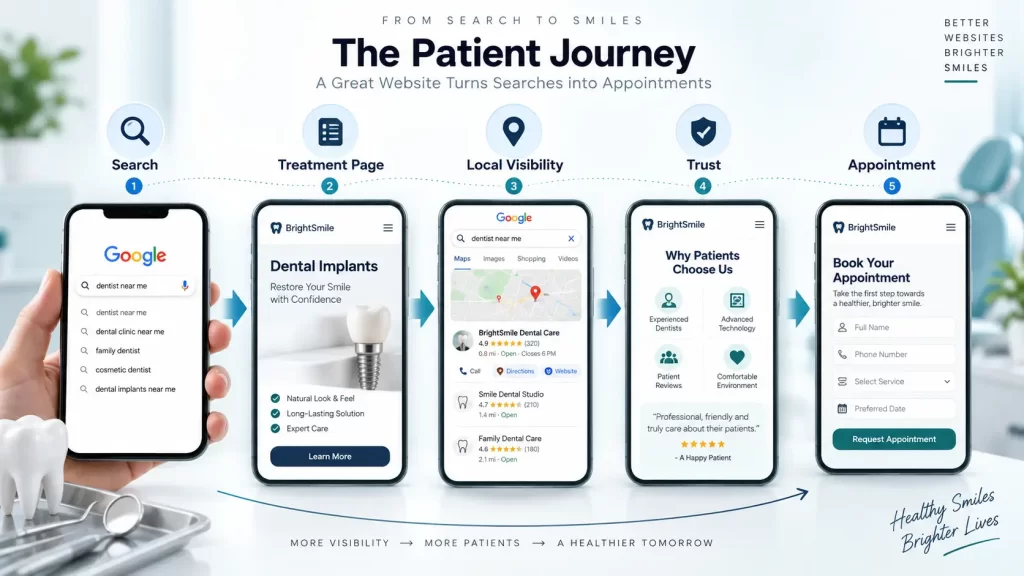
Think in Terms of Patient Journeys
Don’t design the website around your internal organization.
Design it around what prospective patients want to accomplish.
For example:
Search → Treatment page → Trust information → Location → Appointment CTA
That journey should be obvious.
Give Every Important Service a Purpose-Built Page
A page titled “Services” isn’t always enough.
Important treatments deserve enough content to answer genuine patient questions.
Use Real Practice Photography
People want to know where they are going.
Real photographs of the practice and team can communicate something stock photography cannot.
Make the Phone Number Easy to Find
A dental website should make contacting the practice easy.
Don’t make visitors hunt for the phone number.
Track Conversions, Not Just Traffic
Traffic is useful, but the practice should also understand:
- Appointment requests
- Phone clicks
- Form submissions
- Booking clicks
- Location interactions
The ADA recommends reviewing website analytics regularly and tracking performance against the practice’s goals.
Build for the Next Three Years, Not Just Launch Day
A website should be maintainable.
Ask how easily you can add:
- New treatment pages
- New doctors
- New locations
- New content
- New integrations
A slightly better architecture today can prevent a complete rebuild later.
Frequently Asked Questions
There is no universal price. The ADA says basic customized dental websites can cost about $6,000, while high-end websites with additional features can reach $25,000. Current 2026 market estimates also show lower-cost template projects and higher-cost custom or multi-location builds. The final cost depends on scope, design, content, integrations and ongoing services.
There is no single reliable national average because providers define “dental website” differently. For budgeting purposes, many professional single-location projects fall in the several-thousand-dollar range, while advanced custom projects can reach $15,000–$25,000 or more.
A basic website with a template or relatively simple custom build can cost considerably less than a full marketing-focused website. The final price depends on the number of pages, design, content, booking functionality, SEO and developer involvement.
Not necessarily. A practice can use a simple appointment request form or link to an external scheduling system. Online booking becomes more valuable when it fits the practice’s workflow and makes scheduling easier for patients and staff.
If the practice wants to attract patients through organic search, SEO should be part of the website strategy. Technical SEO, site architecture, treatment pages, local optimization and useful content can all contribute to a stronger search foundation.
A detailed quote should identify design, number of pages, development, content, integrations, SEO, hosting, security, testing, launch, support and ownership. If something is not listed, ask whether it is included before signing.
HIPAA applies to covered entities and business associates under the circumstances defined by federal law. Many dentists and dental practices can fall within the healthcare-provider category of covered entities. Whether a particular website, form or third-party service creates HIPAA obligations depends on how the practice operates and what information is handled. Practices should obtain appropriate legal/compliance advice for their circumstances.
The dental practice should have clear ownership and access to its domain and website assets. The ADA specifically advises practices to make sure they own the website, domain, content and code or have appropriate contractual rights.
Key Takeaways
The most important lessons about dental website cost are straightforward:
- There is no universal price for a dental website.
- A basic customized site can be very different from an advanced patient-acquisition platform.
- The ADA’s current guidance places a basic customized dental website around $6,000 and high-end sites as high as $25,000.
- Treatment-page depth, design, booking, content, integrations and SEO can substantially affect the budget.
- Hosting, software and maintenance create additional ongoing costs.
- Dental practices should pay particular attention to privacy, security and accessibility.
- The cheapest quote isn’t necessarily the lowest total cost.
- The most important comparison is the scope of work—not the headline price.
- Website ownership should be clarified before development begins.
- SEO and performance should be considered during development rather than treated as an afterthought.
Final Thoughts
The real question behind dental website cost in the USA isn’t whether a website should cost $2,000, $6,000 or $20,000.
It’s whether the proposed website is appropriate for the practice.
A new single-location dentist may need a focused, professional website with strong service pages, local information, clear calls to action and reliable maintenance.
A competitive cosmetic dentistry practice may need much more: extensive treatment content, professional photography, advanced booking, stronger local SEO and conversion-focused design.
A multi-location dental group may need custom integrations, location architecture, advanced workflows and a significantly larger technical investment.
The best starting point is therefore not a price tag.
Start with the business goal, define the patient journey, list the functionality you actually need, and then compare vendors against the same scope.
That approach makes it much easier to understand what you are paying for—and much harder to accidentally overpay for a website that doesn’t solve the practice’s real problems.
Next Steps for a Dental Practice
Before requesting your next website quote, prepare these five things:
- Your current website URL, if you have one
- A list of treatments and services
- Your target locations
- Your preferred appointment process
- Three examples of dental websites you like
Then ask each developer to quote the same scope.
That one step can make website proposals much easier to compare.
If your existing website is slow, difficult to manage, outdated or not generating the enquiries you expect, a website audit can also be more useful than immediately starting a redesign.