
How much should a clinic, medical practice, or healthcare organization budget for a professional WordPress website?
If you’re planning to build a healthcare website in the United States, one of the first questions you’re likely to ask is:
“How much will it cost to build a website that looks professional, attracts patients, and supports our business?”
The answer depends on what your website needs to do.
A simple website for a small medical practice is very different from a healthcare platform with appointment integrations, patient portals, insurance-related functionality, and connections to electronic health record systems.
Both may use WordPress as their content management system, but their development requirements and their budgets can be dramatically different.
Based on pricing ranges published by healthcare website development specialists, a basic solo-practitioner website may start in the low thousands of dollars, while complex healthcare projects can extend into tens of thousands of dollars or more. These are indicative market examples, not fixed industry rates.
At Nizwas IT Solutions, we believe that understanding what you’re paying for is just as important as knowing the final price.
This guide explains the cost of healthcare WordPress website development in the USA, the factors that influence the budget, and the questions you should ask before hiring a development partner.
What you’ll learn: Healthcare website pricing, feature-based budgeting, HIPAA considerations, accessibility, development costs, common mistakes, and practical steps for planning your project.
Quick Overview: Healthcare Website Development Costs in the USA
The following figures are illustrative planning ranges, not verified national averages.
Actual costs depend on the development team, location, functionality, content, integrations, compliance requirements, and project complexity.
| Type of healthcare website | Illustrative budget range | Typical use case |
|---|---|---|
| Basic healthcare website | $3,000–$8,000 | Solo practitioners and small practices |
| Professional clinic website | $8,000–$20,000 | Multi-service clinics and growing practices |
| Multi-location healthcare website | $20,000–$50,000+ | Organizations with multiple locations |
| Complex healthcare platform | $30,000–$75,000+ | Projects involving custom workflows and integrations |
These ranges are broad planning examples informed by published healthcare website pricing guidance. They are not quotes from Nizwas IT Solutions, and some complex projects may cost substantially more.
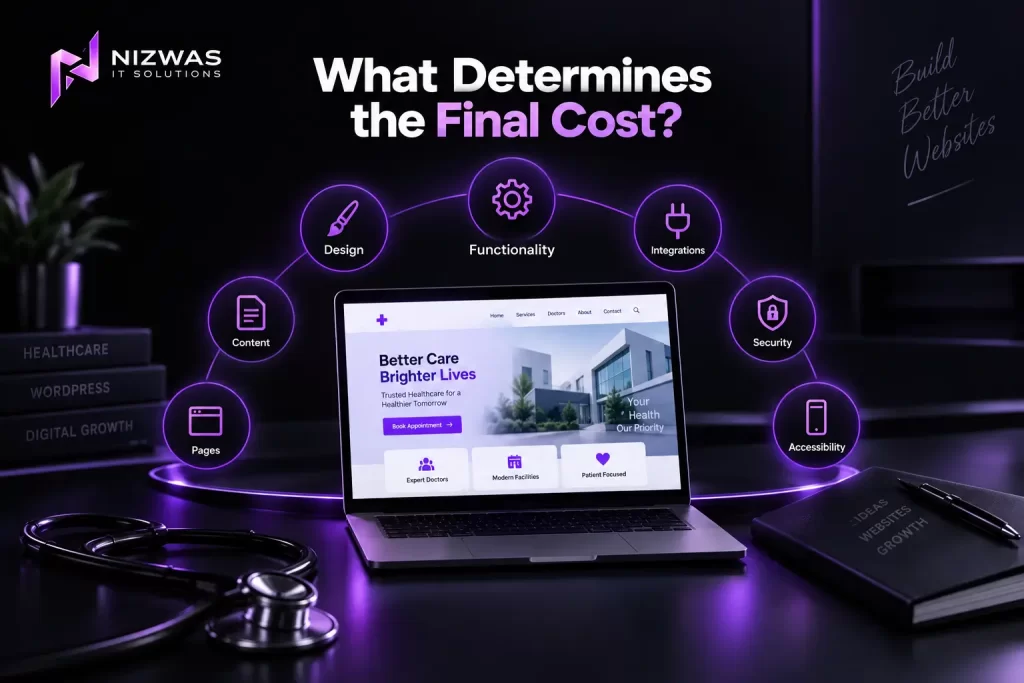
What determines the final cost?
The most important factors are:
- Number of pages and website templates.
- Design and branding requirements.
- Appointment and scheduling functionality.
- Third-party integrations.
- Privacy and security requirements.
- Accessibility and mobile usability.
- Content creation and migration.
- Custom WordPress development.
- Testing and ongoing maintenance.
The number of pages matters, but the complexity of the functionality often matters more.
What Is a Healthcare WordPress Website?
A healthcare WordPress website is a website built using WordPress to help a medical practice, clinic, healthcare organization, or related business communicate with its audience and manage digital experiences.
Depending on its purpose, it might include:
- Information about medical services.
- Doctor and staff profiles.
- Clinic locations.
- Opening hours.
- Insurance information.
- Contact details.
- Appointment-request forms.
- Patient resources.
- Educational articles.
- Accessibility features.
- Integrations with external scheduling platforms.
Some healthcare websites are primarily informational.
Others are connected to systems that handle sensitive patient information.
That distinction is critical when planning a budget.
Informational website versus patient-facing platform
Consider two examples.
Example 1: A small dermatology practice
The practice wants a website with:
- A homepage.
- Service pages.
- Doctor profiles.
- A contact page.
- An appointment-booking link.
- A blog.
- Location information.
This may be a relatively straightforward WordPress project.
Example 2: A multi-location healthcare organization
The organization wants:
- Multiple location pages.
- Provider directories.
- Appointment scheduling.
- Patient account access.
- Integration with an external healthcare system.
- Custom reporting.
- Advanced security controls.
This is a much more complex project.
It may involve custom software development, external vendors, detailed security requirements, and specialist compliance advice.
The technology and risk requirements not just the visual design help determine the budget.
Who Is This Guide For?
This guide is intended for:
- Doctors opening a private practice.
- Small and medium-sized medical clinics.
- Dental and specialist practices.
- Healthcare startups.
- Multi-location healthcare businesses.
- Healthcare marketing managers.
- Business owners planning a medical website redesign.
- Agencies comparing WordPress development partners.
It is particularly useful if you’re preparing a project brief or requesting proposals from website development companies in the USA.
Who published this guide?
This article is published by Nizwas IT Solutions, a WordPress development and digital solutions company.
Nizwas provides website development, WordPress solutions, performance optimization, technical SEO, and website maintenance services.
The company’s website describes its work with business websites, custom WordPress development, integrations, performance, and ongoing support.
This article is intended to provide practical planning information. It is not a medical, legal, or HIPAA compliance certification.
Why Does Healthcare Website Cost Matter?
A healthcare website is often one of the first places prospective patients go when researching a provider.
They may be looking for answers to simple questions:
- Does this clinic offer the service I need?
- Where is the practice located?
- Does the provider accept my insurance?
- How can I request an appointment?
- Can I find information about the doctors?
- Is the website easy to use on my phone?
A website that doesn’t answer these questions clearly may create unnecessary friction.
However, spending more money doesn’t automatically produce a better website.
The goal is to invest in the features and technical foundations that support the organization’s actual needs.
The cost of a poor website decision
An inexpensive website may become expensive to maintain if it includes:
- A difficult-to-manage theme.
- Poorly documented custom code.
- Unnecessary plugins.
- Inadequate hosting.
- Weak content structure.
- Inaccessible forms.
- Incompatible third-party integrations.
On the other hand, a project can become unnecessarily expensive when a business pays for features it doesn’t need.
A well-defined scope helps prevent both underinvestment and unnecessary spending.
7 Factors That Influence Healthcare WordPress Website Cost
1. Website Size and Content Structure
The number of pages affects the amount of design, development, content preparation, and testing required.
A five-page website is usually simpler to plan than a website containing 100 service, provider, and location pages.
However, page count alone doesn’t tell the whole story.
Typical website components
A small healthcare website might include:
| Page or feature | Purpose |
|---|---|
| Homepage | Introduces the practice and guides visitors |
| About page | Explains the organization and its values |
| Services pages | Describes treatments or services |
| Provider profiles | Introduces doctors and healthcare professionals |
| Contact page | Provides contact details and directions |
| Location pages | Helps patients find relevant facilities |
| Blog or resources | Shares educational information |
| Appointment link | Directs users to an approved booking system |
| Privacy and legal pages | Supports transparency and legal requirements |
A larger website may also require:
- Custom content types.
- Provider search.
- Location filters.
- Multi-language content.
- Advanced navigation.
- Search functionality.
- Custom templates.
- Content migration.
How to control costs
Start with the pages that are essential for launch.
You can plan additional functionality for a later phase if it isn’t required immediately.
For example, a new medical practice might launch with a clear website, provider profiles, service pages, and an external appointment-booking system.
A custom provider directory or advanced patient-facing application could be considered later.
Build around the organization’s priorities not an unnecessarily large feature list.
2. Design, Branding, and User Experience
Healthcare websites need to communicate information clearly.
Visitors may be anxious, unfamiliar with medical terminology, or using a mobile device while trying to find essential information.
Design decisions can influence how easily they navigate the website.
What affects design costs?
- Custom branding.
- Original UI/UX design.
- Number of unique page templates.
- Responsive layouts.
- Accessibility considerations.
- Custom illustrations.
- Photography and video.
- Interactive elements.
- Design revisions.
- Content presentation.
Template versus custom design
A template-based website may reduce initial design costs.
It can work well for a small practice with straightforward requirements.
A custom design may be more appropriate when an organization needs:
- A distinctive brand identity.
- Complex information architecture.
- Multiple service categories.
- A custom provider directory.
- A tailored patient journey.
- Integration with existing digital systems.
Neither approach is automatically better.
The right choice depends on the organization’s needs and budget.
A practical UX recommendation
Before designing the homepage, answer this question:
What is the most important action a visitor should be able to take?
For a clinic, that might be finding a service, requesting an appointment, or locating a facility.
The design should make that action easy to understand.
A polished visual style is useful, but clarity, accessibility, and straightforward navigation should take priority over unnecessary visual complexity.
3. Appointment Scheduling and Third-Party Integrations
Appointment functionality can have a significant impact on healthcare website costs.
There is a major difference between linking visitors to an existing scheduling platform and building a custom appointment system.
Option A: Link to an existing booking system
The website includes a button such as:
“Request an Appointment”
The button directs visitors to a third-party scheduling platform.
Advantages:
- Potentially simpler WordPress development.
- Less custom functionality.
- Existing scheduling features may already be available.
- The external platform may handle sensitive workflows.
The provider must still review the external platform’s privacy, security, and contractual suitability.
Option B: Embed a scheduling experience
A scheduling provider may offer an embedded booking interface.
The website development team needs to check:
- Mobile usability.
- Accessibility.
- Performance.
- Integration behavior.
- Data handling.
- Compatibility with the website.
Option C: Build a custom booking workflow
A custom system may require:
- Provider availability.
- Scheduling rules.
- Appointment types.
- Time-zone handling.
- Notifications.
- Cancellation processes.
- Administrative interfaces.
- External system integration.
If sensitive health information is involved, the project may also require additional privacy and security analysis.
Why integrations affect cost
Integrations may require:
- API development.
- Authentication.
- Data mapping.
- Error handling.
- Testing.
- Ongoing maintenance.
- Vendor coordination.
A simple link and a custom healthcare scheduling system are not comparable projects.
Ask your development partner to identify exactly which parts of the scheduling experience they are building and which parts are provided by another platform.
4. HIPAA, Privacy, and Security Requirements
This is one of the most important areas to understand before developing a healthcare website in the USA.
Does every medical website need to be HIPAA compliant?
Not automatically.
HIPAA applies to covered entities and certain business associates under defined circumstances.
A basic informational website that does not collect, maintain, or transmit protected health information on behalf of a covered entity may have different obligations from a patient portal or a website handling patient-related data.
The specific facts matter.
The U.S. Department of Health and Human Services explains that a business associate relationship can arise when an organization performs certain services involving protected health information for a covered entity. Written business associate agreements may be required in applicable circumstances.
Examples of functionality that require careful assessment
- Patient intake forms.
- Patient portals.
- Appointment systems that collect sensitive information.
- Telehealth integrations.
- Patient account registration.
- Healthcare CRM integrations.
- Medical document uploads.
- Patient communications.
- Systems that transmit protected health information.
Website forms deserve special attention
A common mistake is adding a standard contact form to a healthcare website and asking visitors to enter detailed medical information.
That may create unnecessary privacy and security risks.
For example, a general inquiry form might ask for:
- Name.
- Contact information.
- Preferred method of contact.
- A general reason for contacting the practice.
Whether any particular form is appropriate depends on the organization’s needs and applicable requirements.
Avoid requesting sensitive information unless there is a legitimate reason and the appropriate safeguards are in place.
Tracking technologies and healthcare websites
Analytics and advertising tools require careful consideration.
HHS guidance explains that tracking technologies on certain healthcare webpages can collect information that is subject to HIPAA protections.
For example, appointment-related information and identifiers may be involved in interactions with tracking technologies. Appropriate permissions, safeguards, and business associate arrangements may be necessary in relevant circumstances.
This means healthcare organizations should not assume that adding a tracking pixel is a routine technical decision.
Security costs may include
- Secure hosting configuration.
- Access control.
- Backup procedures.
- Software updates.
- Vulnerability monitoring.
- Encryption where appropriate.
- Secure integrations.
- Audit logging where needed.
- Security testing.
- Incident-response planning.
A critical distinction
A hosting provider or web development company saying that a website is “HIPAA compliant” is not, by itself, proof that the entire system satisfies applicable requirements.
Compliance depends on the complete environment, processes, contracts, safeguards, and the way the system is used.
Your development partner should help identify technical requirements, but legal and compliance determinations should be reviewed with qualified professionals.
5. Accessibility and Mobile Experience
Healthcare websites should be usable by people with different abilities.
Visitors may use screen readers, keyboard navigation, browser zoom, voice control, or other assistive technologies.
An inaccessible website can make it difficult for people to find essential healthcare information.
The U.S. Department of Justice explains that inaccessible online services can create barriers for people with disabilities and provides guidance on website accessibility under the Americans with Disabilities Act.
Accessibility considerations
A healthcare website should be reviewed for:
- Keyboard navigation.
- Appropriate color contrast.
- Clear headings.
- Descriptive link text.
- Alternative text for meaningful images.
- Form labels.
- Error messages.
- Focus indicators.
- Accessible menus.
- Captions for relevant video content.
Mobile optimization
Many visitors will access a clinic website from a smartphone.
Important considerations include:
- Readable text.
- Easy-to-use menus.
- Touch-friendly buttons.
- Fast-loading pages.
- Clear appointment links.
- Accessible forms.
- Easy-to-find contact details.
- Stable layouts.
Does accessibility increase development costs?
It can, particularly if accessibility requirements are identified late in the project.
Building accessibility into the design and development process can reduce the need for extensive rework.
The exact cost depends on the website’s complexity and the level of testing required.
Accessibility is not simply a design feature. It is part of making healthcare information easier for people to access.
6. SEO and Healthcare Content Requirements
A website can look professional and still struggle to attract relevant visitors from search engines.
For healthcare businesses, SEO involves more than adding keywords to service pages.
Search visibility depends on several factors, including content quality, technical implementation, relevance, and the credibility of the information provided.
Healthcare SEO considerations
A healthcare website may need:
- Clear service pages.
- Location-specific content.
- Provider profiles.
- Search-friendly page titles.
- Descriptive URLs.
- Logical internal linking.
- Mobile-friendly layouts.
- Structured data where appropriate.
- Accessible content.
- Fast-loading pages.
- Clear contact information.
- Carefully reviewed medical content.
Why healthcare content needs additional care
Healthcare content can influence people’s decisions about their health.
Content should be accurate, appropriately sourced, and reviewed by qualified healthcare professionals when necessary.
A website development company can help with content structure, technical SEO, and publishing workflows.
However, technical expertise in WordPress does not automatically make a company qualified to provide medical advice.
What can increase SEO costs?
- Original medical content.
- Professional medical content review.
- Location-based landing pages.
- Technical SEO audits.
- Content migration.
- Structured data implementation.
- Ongoing content management.
- Multilingual content.
A practical approach
Start by identifying the questions patients actually ask.
For example:
- What services does the practice offer?
- Where is the clinic located?
- What should a new patient bring?
- How can someone request an appointment?
- Which insurance plans are accepted?
The exact content should be developed with the healthcare organization.
Useful, accurate information is more valuable than a website filled with repetitive keyword-focused pages.
7. Ongoing Maintenance and Hosting
Launching a website is not the end of the project.
WordPress websites depend on software, hosting, themes, plugins, integrations, and content management systems that need ongoing attention.
Common ongoing costs
| Expense | What it covers |
|---|---|
| Hosting | Server resources and website infrastructure |
| Domain | Website address registration |
| SSL/TLS | Secure website connections |
| WordPress maintenance | Updates and technical upkeep |
| Backups | Recovery support in case of data loss |
| Security monitoring | Detection and investigation of potential threats |
| Performance optimization | Ongoing improvements to loading experience |
| Content updates | Adding or revising website content |
| Plugin licenses | Paid plugin or software subscriptions |
| Third-party services | Scheduling, forms, analytics, or other integrations |
These costs vary considerably by provider and project requirements.
Why healthcare websites need a maintenance plan
Healthcare websites may depend on integrations and workflows that must continue working reliably.
A broken appointment link or outdated service page can create unnecessary problems for visitors.
Maintenance may include:
- WordPress updates.
- Plugin and theme compatibility checks.
- Backup verification.
- Security reviews.
- Performance monitoring.
- Broken-link checks.
- Content updates.
- Form testing.
- Integration troubleshooting.
Nizwas IT Solutions offers website maintenance and security services that include WordPress updates, backups, security monitoring, and performance-related support.
When comparing development quotes, ask what happens after launch.
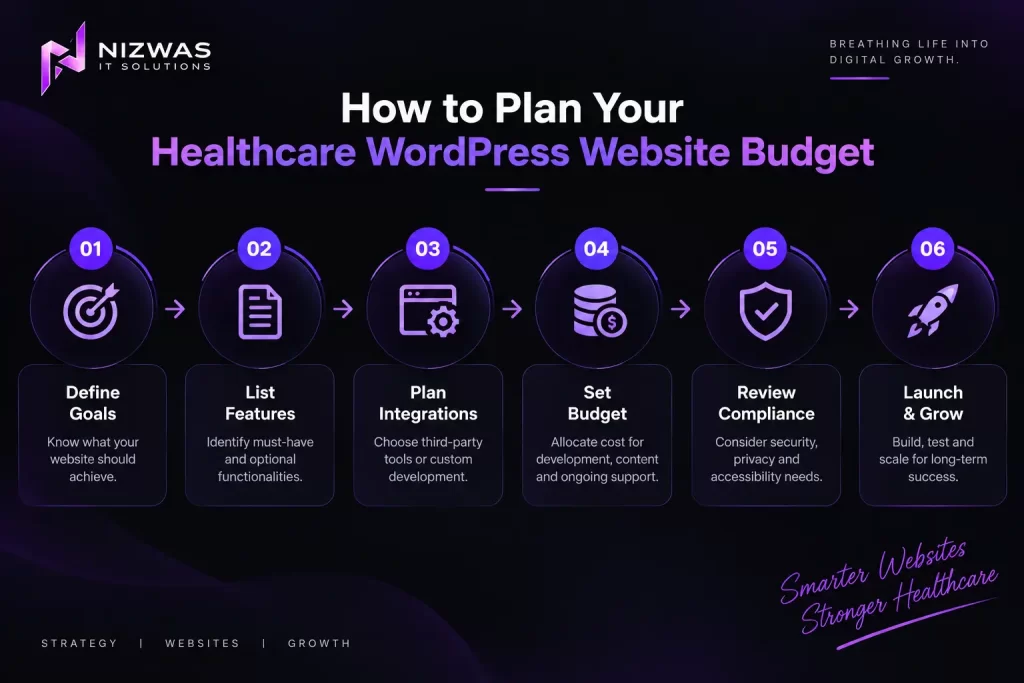
How to Plan Your Healthcare WordPress Website Budget
Instead of starting with a fixed price, begin with a project scope.
Here is a practical process.
Step 1: Define the Website’s Purpose
Write down what the website needs to accomplish.
For example:
We need a website for a medical practice that explains our services, introduces our providers, helps patients find our locations, and directs visitors to our appointment-booking system.
This is more useful than simply saying:
We need a modern healthcare website.
A clear objective helps developers recommend appropriate functionality.
Step 2: Create a Feature List
Separate essential features from optional additions.
Essential features
- Responsive design.
- Homepage.
- Service pages.
- Provider profiles.
- Contact information.
- Appointment access.
- Privacy-related website content.
- Basic SEO foundations.
- Accessibility considerations.
Optional features
- Advanced provider search.
- Multi-location filtering.
- Multilingual content.
- Custom patient-facing functionality.
- CRM integrations.
- Advanced analytics.
- Custom calculators.
- Interactive educational tools.
This separation makes it easier to prioritize spending.
Step 3: Decide What Needs Custom Development
Ask whether each feature can be provided through:
- Standard WordPress functionality.
- A carefully selected plugin.
- A third-party service.
- A custom integration.
- Custom WordPress development.
For example, a simple appointment link may not require custom development.
A system that synchronizes provider availability with another platform may require API development.
The difference can affect both the initial budget and ongoing maintenance.
Step 4: Request Detailed Proposals
When contacting development companies, ask for a written breakdown.
Your proposal should identify:
- Number of pages.
- Number of unique templates.
- Design process.
- WordPress development approach.
- Plugins and licenses.
- Hosting responsibilities.
- Integrations.
- Content responsibilities.
- Accessibility testing.
- Security responsibilities.
- Testing process.
- Launch process.
- Post-launch support.
- Estimated timeline.
- Payment milestones.
- Change-request policy.
Example of a useful project brief
Project: WordPress website for a healthcare practice in the USA
Business type: Multi-provider medical clinic
Primary goal: Generate qualified appointment inquiries
Estimated size: 15–25 pages
Required features: Provider profiles, service pages, location information, responsive design, SEO foundations, and integration with an existing appointment platform
Additional requirements: Accessibility review, performance optimization, content migration, and ongoing maintenance
Target audience: Patients and prospective patients in the clinic’s service area
Budget: To be determined after reviewing scope and technical requirements
This gives development companies a consistent starting point.
Step 5: Plan for Ongoing Costs
Don’t spend the entire budget on the initial build.
Reserve resources for:
- Hosting.
- Software licenses.
- Maintenance.
- Content updates.
- Security improvements.
- Future integrations.
- Technical support.
A website that is affordable to launch but difficult to maintain may become expensive over time.
Common Mistakes to Avoid When Building a Healthcare Website
Mistake 1: Choosing the Cheapest Quote Without Comparing Scope
Two agencies may provide very different services for the same quoted price.
One may include custom design, testing, content migration, and support.
The other may provide a basic template and limited revisions.
Compare deliverables not just the total amount.
Mistake 2: Assuming Every Healthcare Website Requires the Same Compliance Setup
An informational clinic website and a patient portal have different technical and privacy considerations.
Ask what information the website will collect and where that information will go.
Mistake 3: Collecting Sensitive Patient Information Through Ordinary Forms
Avoid adding fields for detailed medical information unless the workflow has been properly designed and reviewed.
Use appropriate systems for sensitive data where necessary.
Mistake 4: Ignoring Accessibility Until Launch
Accessibility problems can be more difficult to resolve after a website has been built.
Include accessibility considerations during design and development.
Mistake 5: Focusing Only on Appearance
A beautiful website still needs:
- Clear navigation.
- Useful content.
- Reliable forms.
- Good mobile usability.
- Appropriate security.
- Maintainable code.
Mistake 6: Forgetting Content Costs
A website development quote may not include:
- Medical copywriting.
- Professional photography.
- Content review.
- Translation.
- Provider biographies.
- Service descriptions.
Clarify who is responsible for creating and approving content.
Mistake 7: Expecting a New Website to Automatically Generate Patients
A website can support visibility and lead generation, but results depend on factors such as demand, content, SEO, competition, user experience, and the organization’s marketing strategy.
Website development is an investment in infrastructure not a guarantee of business growth.
How Nizwas IT Solutions Can Support Your Healthcare Website Project
Nizwas IT Solutions provides WordPress development and digital solutions for businesses that need a professional, maintainable website.
Our website development services include custom WordPress websites, responsive design, SEO foundations, integrations, and performance-focused development.
For a healthcare website project, the appropriate scope would depend on the organization’s requirements.
Our potential areas of support
WordPress website development
Developing a website around your content structure, branding, and business objectives.
Custom functionality
Building or configuring WordPress features where standard functionality isn’t sufficient.
Website performance
Reviewing loading performance, images, scripts, and other technical factors.
Technical SEO
Supporting website structure, crawlability, metadata, and other technical SEO requirements.
Website maintenance
Helping maintain WordPress installations, updates, backups, security configurations, and website functionality.
Integration support
Working with appropriate third-party systems and technical interfaces, subject to compatibility and security requirements.
Our development approach
A healthcare website project should begin with understanding the business and technical requirements.
At Nizwas, our stated development process includes discovery, planning, design, development, testing, launch, and ongoing support.
For projects involving sensitive healthcare information, the scope should also establish who is responsible for privacy and compliance decisions.
We recommend agreeing on the technical scope before discussing a final development price.
Explore our services
- WordPress and website development services
- Website design and development
- Technical SEO services
- Website maintenance and security
- About Nizwas IT Solutions
Frequently Asked Questions
A healthcare WordPress website may cost a few thousand dollars for a simple practice website, while larger projects involving custom functionality and integrations can cost tens of thousands of dollars or more.
The final cost depends on the number of pages, design, integrations, content, technical requirements, and ongoing support.
A basic website for a small medical practice may fall within an illustrative budget of approximately $3,000–$8,000.
This is a planning example rather than a fixed market rate. Custom design, extensive content, specialized functionality, and integrations can increase the cost.
Not every medical website automatically falls under HIPAA requirements.
HIPAA obligations depend on the organization, the data involved, and how the website and related services are used.
Websites that handle protected health information may require additional safeguards and contractual arrangements.
Consult qualified privacy or healthcare compliance professionals for a project-specific assessment.
The cost depends on the booking solution.
A simple link to an existing scheduling platform may require relatively little development work.
An embedded scheduling experience or custom booking system may require additional design, integration, testing, and maintenance.
WordPress can be suitable for healthcare organizations that need a flexible content management system for informational websites and certain business workflows.
Its suitability depends on the required functionality, security architecture, integrations, maintenance, and data-handling requirements.
A patient portal or system handling sensitive healthcare information requires more careful technical planning than a standard informational website.
A small informational healthcare website may take several weeks to design, develop, review, and launch.
Larger websites with many templates, extensive content, custom functionality, or integrations may take considerably longer.
The timeline depends on the scope, availability of content, feedback cycles, and technical complexity.
A small informational healthcare website may take several weeks to design, develop, review, and launch.
Larger websites with many templates, extensive content, custom functionality, or integrations may take considerably longer.
The timeline depends on the scope, availability of content, feedback cycles, and technical complexity.
Ask about:
- Relevant development experience.
- WordPress architecture.
- Custom functionality.
- Accessibility testing.
- Security responsibilities.
- Data-handling requirements.
- Third-party integrations.
- Content migration.
- Performance testing.
- Post-launch maintenance.
- Pricing and change-request policies.
For projects involving protected health information, ask how responsibilities for applicable privacy and security requirements will be handled.
Ongoing maintenance is strongly worth considering for WordPress websites.
Updates, backups, security monitoring, compatibility checks, content revisions, and integration testing can help keep a website reliable.
The exact maintenance requirements depend on the website’s architecture and functionality.
Final Thoughts: Plan Your Healthcare Website Budget Around What Patients Need
The cost of a healthcare WordPress website in the USA depends on much more than the number of pages or the design style.
A small medical practice may need a straightforward, accessible website with service information and a link to an existing appointment platform.
A larger healthcare organization may need custom templates, multiple locations, advanced integrations, and more extensive security and operational requirements.
These are fundamentally different projects.
Before requesting a quote, define your website’s purpose, identify essential features, understand what information the website will handle, and clarify ongoing responsibilities.
Then compare development proposals based on what they actually include.
At Nizwas IT Solutions, we believe that a successful website project starts with a clear understanding of your business requirements and continues with practical development, testing, and support.
If you’re planning a healthcare website in the USA, the first step is to understand what your organization needs—and then build a budget around that scope.
Planning a healthcare WordPress website?
Nizwas IT Solutions can help you explore website development, WordPress customization, performance, and ongoing website support.
👉 Explore Nizwas IT Solutions website development services
Have you started planning a healthcare website? What is the biggest challenge you’re facing budget, design, integrations, or choosing the right development partner?