
In today’s digital-first world, having a professional website is no longer optional—it is a necessity. Whether you are a small business owner, startup founder, freelancer, or enterprise brand, your website is the foundation of your online presence. It acts as your digital storefront, marketing engine, and credibility booster all at once.
If you are planning to create a website but feel overwhelmed by technical terms, platforms, and endless options—this guide is for you. In this blog, we will walk you through everything you need to know to create a high-performing, SEO-friendly, and conversion-focused website that actually helps you grow your business.
Why Your Business Needs a Website in 2026
Before diving into the “how,” let’s understand the why.
A professional website helps you:
- Build trust and credibility with potential customers
- Reach customers 24/7 without limitations
- Showcase your services, products, and portfolio
- Generate leads and sales automatically
- Compete with larger brands in your industry
- Improve visibility on Google and other search engines
Without a website, your business risks losing customers to competitors who already have a strong online presence.
Step 1: Define the Purpose of Your Website
Every successful website starts with clarity.
Ask yourself:
- Do I want to generate leads?
- Do I want to sell products online?
- Do I want to showcase my services?
- Do I want to build a personal or company brand?
Your website structure, content, and design depend heavily on its goal. A service-based business website is very different from an eCommerce store or portfolio site.
Step 2: Choose the Right Website Platform
One of the most important decisions is choosing the right platform.
Popular Website Platforms:
- WordPress – Best for flexibility, SEO, scalability, and custom development
- Shopify – Ideal for eCommerce businesses
- Wix / Squarespace – Beginner-friendly but limited scalability
For most businesses, WordPress is the best choice because:
- It powers over 40% of the web
- It is SEO-friendly
- It supports custom themes and plugins
- It grows with your business
Step 3: Select a Domain Name and Hosting
Choosing a Domain Name
Your domain name should:
- Be short and easy to remember
- Reflect your brand or business name
- Avoid numbers and hyphens
- Prefer
.comif available
Example:
✔ yourbusiness.com
✖ your-business-123.net
Choosing Reliable Hosting
A fast website improves user experience and SEO. Look for hosting that offers:
- High uptime (99.9%)
- Fast server speed
- SSL certificate
- Daily backups
- Good customer support
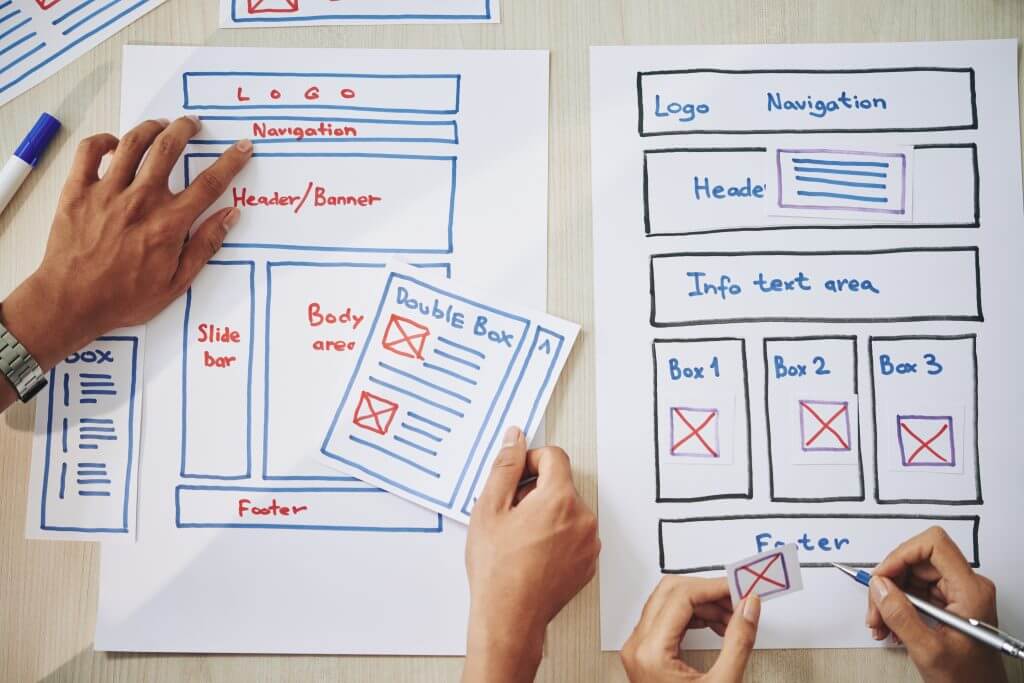
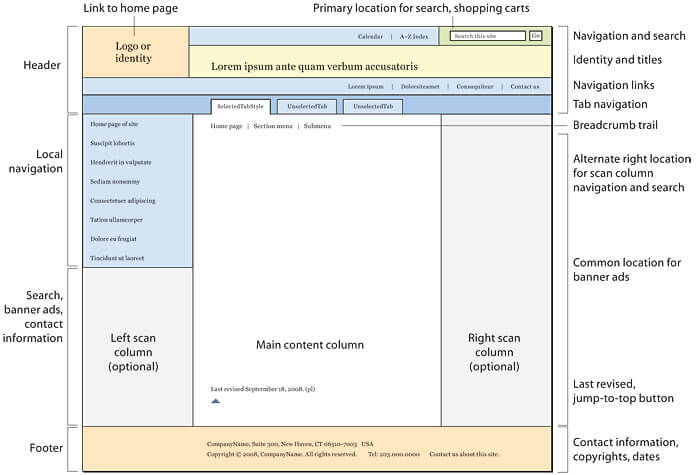
Step 4: Plan Your Website Structure (Sitemap)
A clear structure improves usability and search rankings.
Essential Pages for a Business Website:
- Home
- About Us
- Services / Products
- Industry or Solution Pages
- Blog
- Contact Us
- Privacy Policy & Terms
Search engines love websites that are well-organized and easy to navigate.

4
Step 5: Focus on Professional Website Design
Your website design is the first impression visitors get.
Key Design Principles:
- Clean and modern layout
- Consistent color scheme
- Easy navigation
- Mobile responsiveness
- Fast loading speed
Over 60% of users browse websites on mobile devices. A mobile-responsive design is critical for both SEO and user experience.
Step 6: Create High-Quality, SEO-Optimized Content
Content is the backbone of your website.
Best Practices for Website Content:
- Write for humans first, search engines second
- Use simple, clear language
- Highlight benefits, not just features
- Add call-to-action (CTA) buttons
- Use keywords naturally
Important Content Types:
- Service pages explaining what you offer
- Blog posts answering customer questions
- Case studies and testimonials
- FAQs
Well-written content helps your website rank higher on Google and keeps users engaged.
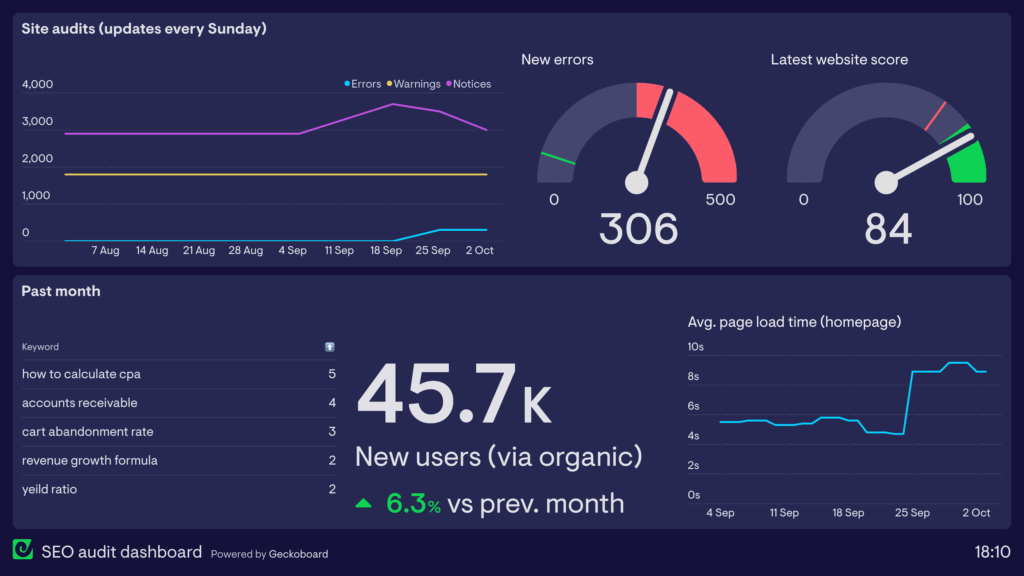
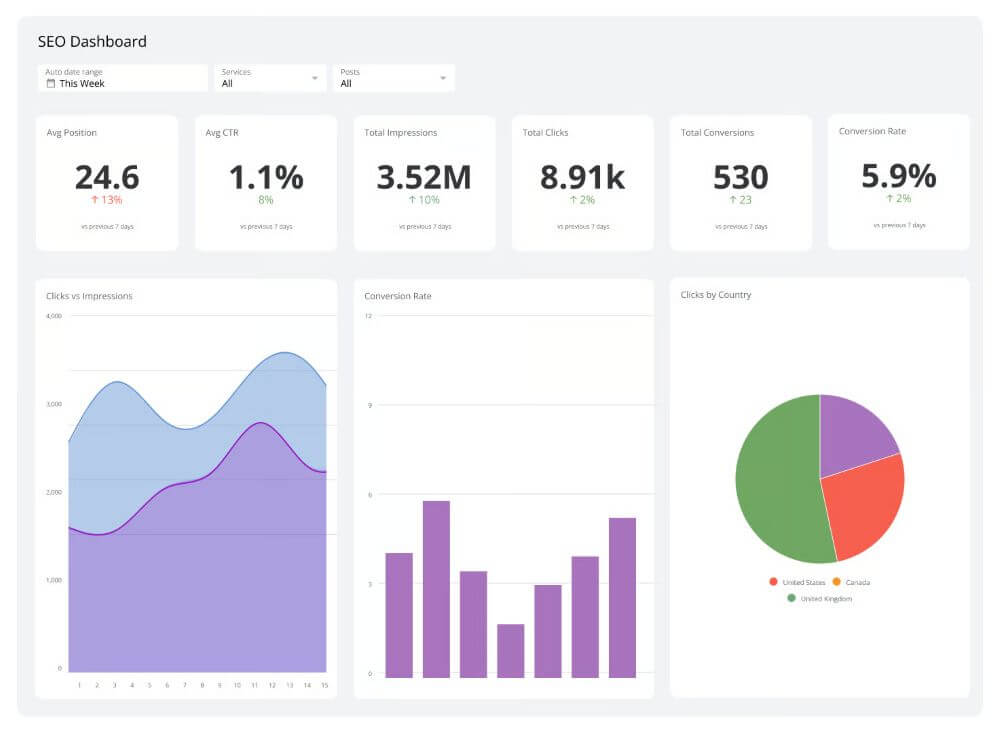
Step 7: Search Engine Optimization (SEO) Basics
SEO ensures your website appears in search results when users search for your services.
On-Page SEO Checklist:
- Keyword-optimized page titles
- Meta descriptions
- SEO-friendly URLs
- Proper heading structure (H1, H2, H3)
- Image alt tags
- Internal linking
Technical SEO:
- Fast loading speed
- Mobile optimization
- Secure HTTPS
- Clean code structure
SEO is not a one-time task—it is an ongoing process.
4
Step 8: Integrate Essential Website Features
A modern business website should include:
- Contact forms
- Click-to-call buttons
- WhatsApp or chat integration
- Google Maps
- Social media links
- Analytics tracking
These features improve conversions and help you track performance.
Step 9: Website Security and Maintenance
Security is often ignored—but it’s critical.
Must-Have Security Measures:
- SSL certificate
- Regular backups
- Firewall protection
- Malware scanning
- Strong passwords
Regular updates and maintenance keep your website secure, fast, and error-free.
Step 10: Launch, Monitor, and Improve
Once your website is live:
- Test all pages and forms
- Check speed and mobile responsiveness
- Submit sitemap to Google Search Console
- Monitor traffic and user behavior
Successful websites evolve based on data and user feedback.
Why Hire a Professional Website Development Company?
While DIY tools exist, a professional agency helps you:
- Avoid technical mistakes
- Build a scalable and secure website
- Implement advanced SEO strategies
- Create a conversion-focused design
- Save time and long-term costs
A professionally built website is an investment, not an expense.
Final Thoughts
Creating a website is not just about design—it’s about strategy, performance, SEO, and user experience. When done right, your website becomes your most powerful digital asset, helping you attract, engage, and convert customers consistently.
If you are serious about growing your business online, now is the perfect time to build a professional, SEO-optimized website that works for you 24/7.