WP Rocket vs NitroPack: Which WordPress Speed Plugin Wins in 2026?
A slow website costs more than just a few seconds of loading time—it can reduce conversions, hurt Google rankings, increase bounce rates, and negatively impact customer experience. As Google’s ranking algorithms continue to prioritize Core Web Vitals, choosing the right WordPress performance plugin has become one of the most important decisions for website owners.
Two names consistently dominate the conversation:
- WP Rocket
- NitroPack
Both promise lightning-fast loading times, improved PageSpeed scores, and better user experiences. However, they achieve these goals in very different ways.
Some developers prefer WP Rocket because of its flexibility and compatibility with virtually every hosting provider. Others choose NitroPack because it combines caching, CDN, image optimization, and cloud-based performance enhancements into a single platform.
But which solution actually performs better in 2026?
In this detailed comparison, we’ll examine every important factor—from caching and Core Web Vitals to pricing, compatibility, SEO impact, WooCommerce performance, and ease of use—to help you determine which plugin is the right choice for your website.
Whether you’re running a small business website in the United States, an eCommerce store in Canada, a digital agency in the United Kingdom, or a growing startup in Australia, Germany, Ireland, Netherlands, New Zealand, Switzerland, or the United Arab Emirates, this guide will help you make an informed decision.
Why Website Speed Matters More Than Ever in 2026
Website speed has evolved far beyond being a simple user experience improvement. Today, it directly influences:
- Organic rankings
- User engagement
- Lead generation
- Conversion rates
- Mobile usability
- Crawl efficiency
- Revenue
Google continues to evaluate websites using Core Web Vitals, a set of performance metrics designed to measure real-world user experience.
The three most important metrics include:
Largest Contentful Paint (LCP)
Measures how quickly the largest visible element loads.
Recommended:
- Under 2.5 seconds
Interaction to Next Paint (INP)
Measures website responsiveness.
Recommended:
- Under 200 milliseconds
Cumulative Layout Shift (CLS)
Measures visual stability.
Recommended:
- Below 0.1
Poor scores can result in:
- Lower search rankings
- Higher bounce rates
- Reduced conversion rates
- Lower user satisfaction
- Poor mobile experience
For businesses targeting competitive markets like the USA, Canada, UK, Australia, and Germany, even a one-second delay can significantly impact leads and revenue.
That’s why investing in a reliable WordPress optimization solution is no longer optional—it’s essential.
What is WP Rocket?
WP Rocket is one of the most trusted premium WordPress caching plugins available today. Since its launch, it has become the preferred optimization solution for developers, agencies, and businesses seeking complete control over website performance.
Unlike many caching plugins that require extensive technical configuration, WP Rocket works immediately after activation while still offering advanced optimization settings for experienced users.
Key Features of WP Rocket
- Page caching
- Browser caching
- GZIP compression
- CSS optimization
- JavaScript optimization
- Critical CSS generation
- Delay JavaScript execution
- Remove unused CSS
- Database cleanup
- Lazy loading
- Preloading cache
- DNS prefetching
- Font optimization
- WooCommerce optimization
- Cloudflare integration
- CDN compatibility
One of WP Rocket’s biggest strengths is its compatibility with nearly every hosting provider, including:
- Cloudways
- Kinsta
- WP Engine
- SiteGround
- Hostinger
- DigitalOcean
- AWS
- Google Cloud
- Vultr
Developers also appreciate its compatibility with popular WordPress builders such as Elementor, Gutenberg, Divi, Bricks Builder, and Oxygen.
What is NitroPack?
NitroPack approaches website optimization differently.
Instead of functioning solely as a WordPress plugin, NitroPack is a cloud-based performance optimization platform that combines multiple technologies into a single service.
Rather than relying only on server-side caching, NitroPack performs much of its optimization through its global cloud infrastructure.
Its all-in-one platform includes:
- Intelligent caching
- Global CDN
- Image optimization
- Automatic WebP conversion
- CSS optimization
- JavaScript optimization
- HTML optimization
- Lazy loading
- Critical CSS
- Font optimization
- Compression
- Edge caching
Because these services operate from NitroPack’s cloud network, many websites experience dramatic PageSpeed improvements with minimal configuration.
This simplicity has made NitroPack particularly attractive for:
- Small businesses
- Marketing agencies
- Non-technical website owners
- eCommerce stores
- High-traffic websites
However, the cloud-based approach also introduces considerations around pricing, platform dependency, and control, which we’ll explore later in this comparison.
WP Rocket vs NitroPack: Quick Overview
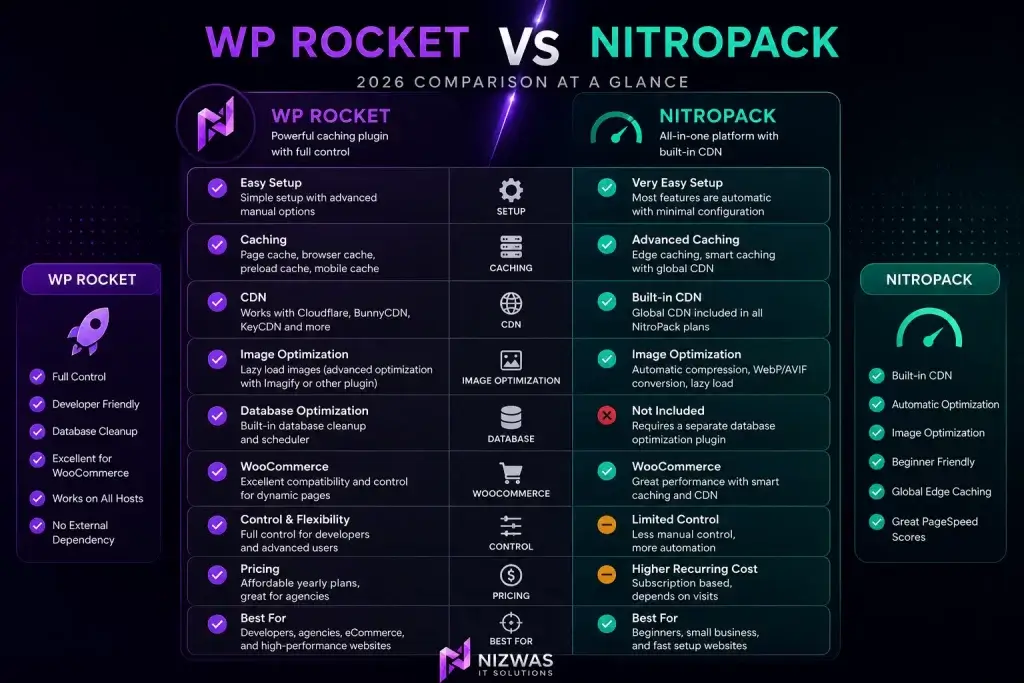
| Feature | WP Rocket | NitroPack |
|---|---|---|
| Type | WordPress Plugin | Cloud-Based Optimization Platform |
| CDN Included | No | Yes |
| Image Optimization | Requires Imagify or another plugin | Built-in |
| Cache | Local Server | Edge Cache + Cloud |
| Ease of Setup | Very Easy | Extremely Easy |
| WooCommerce Support | Excellent | Excellent |
| Core Web Vitals | Excellent | Excellent |
| Developer Control | High | Moderate |
| Hosting Compatibility | Almost Every Host | Almost Every Host |
| Monthly Fees | No | Yes (depending on plan) |
| One-Time License | Yes | No |
Who Should Read This Comparison?
This guide is ideal for:
- Business owners planning a new website
- WordPress developers
- Digital marketing agencies
- SEO professionals
- WooCommerce store owners
- Website administrators
- Bloggers
- Freelancers
- Enterprises looking to improve Core Web Vitals
Whether you’re trying to increase organic traffic, improve Google PageSpeed Insights scores, or reduce website loading times, understanding the differences between WP Rocket and NitroPack will help you choose the right solution.
Internal Linking Opportunities (Nizwas IT Solutions)
As readers progress through this guide, naturally link to relevant service pages on your website, such as:
- WordPress Speed Optimization Services
- Core Web Vitals Optimization
- Technical SEO Services
- WordPress Development Services
- WooCommerce Development
- WordPress Maintenance Services
- Website Performance Optimization
- Website Security Services
- Website Migration Services
- WordPress Support & Maintenance
These internal links strengthen topical authority, improve user navigation, and help search engines understand the relationship between your services and the topics covered in this comparison.
WP Rocket vs NitroPack Feature Comparison (2026)
After understanding what each plugin offers, it’s time to compare them side by side. While both plugins aim to improve website performance, they take very different approaches to optimization. WP Rocket focuses on giving website owners and developers full control over caching and optimization settings, whereas NitroPack automates nearly every aspect of website optimization through its cloud infrastructure.
If you’re deciding which plugin to invest in for your WordPress website in 2026, the following comparisons will help you determine which solution best fits your business needs.
Installation & Ease of Use
For many website owners, ease of setup is just as important as performance. Not everyone has technical experience, and a plugin that delivers results with minimal configuration can save valuable time.
WP Rocket
WP Rocket is widely recognized for its user-friendly setup. Once installed and activated, page caching is enabled automatically, providing an immediate performance boost without requiring extensive configuration.
The dashboard is clean, organized, and divided into logical sections such as:
- Cache
- File Optimization
- Media
- Preload
- Advanced Rules
- Database
- CDN
- Heartbeat
- Add-ons
Most users only need to adjust a few settings to achieve excellent results, while developers can fine-tune optimization for more complex websites.
Advantages
- Beginner-friendly
- Detailed documentation
- Excellent developer control
- Easy rollback if issues occur
- Compatible with staging environments
NitroPack
NitroPack takes automation to another level.
After connecting your website to a NitroPack account, most optimization features are automatically configured. Users can simply choose an optimization level such as:
- Standard
- Medium
- Strong
- Ludicrous
NitroPack then applies image optimization, CDN delivery, caching, CSS optimization, JavaScript optimization, and more without requiring technical knowledge.
This simplicity makes NitroPack appealing for website owners who prefer a “set it and forget it” solution.
Advantages
- Almost zero configuration
- Automatic optimization
- Built-in CDN
- Cloud-based processing
- Fast setup
Winner: Ease of Use
| Plugin | Rating |
|---|---|
| WP Rocket | ⭐⭐⭐⭐☆ |
| NitroPack | ⭐⭐⭐⭐⭐ |
NitroPack wins for beginners thanks to its automated optimization process.
User Interface Comparison
A well-designed interface makes ongoing website optimization much easier.
WP Rocket Dashboard
WP Rocket uses the native WordPress admin interface, allowing users to configure settings directly within the WordPress dashboard.
Everything is organized logically, making navigation simple for beginners while still providing advanced options for developers.
Best For
- Developers
- Agencies
- Technical SEO professionals
- Advanced WordPress users
NitroPack Dashboard
NitroPack combines the WordPress plugin with an online cloud dashboard.
This provides useful information such as:
- Optimization status
- Cache usage
- CDN statistics
- Image optimization
- Performance improvements
Although visually impressive, switching between WordPress and the NitroPack dashboard may feel less convenient for some users.
Winner: Interface
| Plugin | Rating |
|---|---|
| WP Rocket | ⭐⭐⭐⭐⭐ |
| NitroPack | ⭐⭐⭐⭐☆ |
WP Rocket offers a more integrated experience for WordPress users.
Caching Technology Comparison
Caching is one of the biggest contributors to website speed.
WP Rocket Caching
WP Rocket uses traditional server-based caching, including:
- Page Cache
- Browser Cache
- Cache Preloading
- Sitemap Preloading
- Mobile Cache
- Separate Mobile Cache
- Logged-in User Cache
This approach gives website owners complete control over how cached content is generated and served.
Benefits
- Faster server response
- Reduced PHP processing
- Better database efficiency
- Excellent WooCommerce compatibility
NitroPack Caching
NitroPack relies on edge caching through its global cloud network.
Instead of serving cached pages only from your hosting server, optimized pages are distributed across edge servers worldwide.
This significantly reduces latency for international visitors.
NitroPack also includes:
- Smart cache invalidation
- Dynamic caching
- Browser caching
- HTML optimization
- Automatic cache warm-up
Winner: Caching
For international websites serving visitors across multiple countries:
NitroPack wins due to its integrated edge caching and global CDN.
For websites hosted on premium infrastructure such as Cloudways, Kinsta, or WP Engine:
WP Rocket performs exceptionally well without requiring cloud processing.
CSS & JavaScript Optimization
Modern websites load dozens—or even hundreds—of CSS and JavaScript files. Optimizing these assets is essential for improving Core Web Vitals.
WP Rocket Features
WP Rocket provides:
- Minify CSS
- Combine CSS (optional)
- Remove Unused CSS
- Minify JavaScript
- Delay JavaScript Execution
- Load JavaScript Deferred
- Critical CSS Generation
These settings allow developers to fine-tune optimization based on the site’s theme and plugins.
NitroPack Features
NitroPack automatically handles:
- CSS Minification
- JavaScript Minification
- CSS Compression
- JavaScript Compression
- Critical CSS
- Render Blocking Resource Removal
- Automatic Optimization Profiles
Most users never need to adjust these settings manually.
Winner
| Feature | WP Rocket | NitroPack |
|---|---|---|
| Manual Control | ⭐⭐⭐⭐⭐ | ⭐⭐⭐ |
| Automation | ⭐⭐⭐ | ⭐⭐⭐⭐⭐ |
Developers generally prefer WP Rocket for its flexibility, while beginners appreciate NitroPack’s automation.
Critical CSS Comparison
Critical CSS determines how quickly above-the-fold content appears.
WP Rocket
- Automatically generates Critical CSS
- Removes unused CSS
- Improves Largest Contentful Paint (LCP)
- Optimized for PageSpeed Insights
NitroPack
NitroPack dynamically generates Critical CSS through its cloud infrastructure and continuously updates it as website content changes.
This process is largely hands-off, reducing the need for manual intervention.
Winner
Both plugins perform exceptionally well in this area.
Result: Tie ⭐⭐⭐⭐⭐
Remove Unused CSS
Unused CSS increases page size and slows rendering.
WP Rocket
- Intelligent Remove Unused CSS
- Compatible with most modern themes
- Developer-friendly exclusions
NitroPack
Automatically removes unnecessary CSS during optimization without requiring user input.
Winner
Another close contest.
Tie
Image Optimization
Images often account for the largest portion of a webpage’s total size.
WP Rocket
WP Rocket includes lazy loading and image optimization support but relies on Imagify (or another image optimization plugin) for advanced compression and WebP conversion.
Features
- Lazy Load Images
- Lazy Load iFrames
- Replace YouTube iframes with preview images
- WebP support via compatible plugins
NitroPack
NitroPack includes image optimization as part of its platform.
It automatically performs:
- Image compression
- WebP conversion
- AVIF support (where available)
- Responsive image resizing
- Lazy loading
- CDN delivery
No additional plugins are required.
Winner
| Plugin | Rating |
|---|---|
| WP Rocket | ⭐⭐⭐⭐☆ |
| NitroPack | ⭐⭐⭐⭐⭐ |
NitroPack provides a more comprehensive image optimization solution out of the box.
CDN Integration
A Content Delivery Network (CDN) improves loading times by serving files from servers closest to the visitor.
WP Rocket
WP Rocket supports integration with:
- Cloudflare
- BunnyCDN
- KeyCDN
- StackPath
- Amazon CloudFront
- QUIC.cloud (manual configuration)
However, users must configure a CDN separately.
NitroPack
NitroPack includes a built-in global CDN, eliminating the need for a third-party service.
This simplifies setup and enhances performance for international audiences.
Winner
NitroPack wins for convenience and global delivery.
Core Web Vitals Performance
Based on our experience optimizing WordPress websites at Nizwas IT Solutions, both plugins are capable of achieving excellent Core Web Vitals scores when properly configured.
Typical Improvements
| Metric | WP Rocket | NitroPack |
|---|---|---|
| Largest Contentful Paint (LCP) | Excellent | Excellent |
| Interaction to Next Paint (INP) | Excellent | Excellent |
| Cumulative Layout Shift (CLS) | Excellent | Excellent |
| Mobile Performance | Excellent | Excellent |
| Desktop Performance | Excellent | Excellent |
The biggest difference lies in how these improvements are achieved:
- WP Rocket gives you granular control and works best when paired with quality hosting and a CDN.
- NitroPack delivers strong results through its cloud-based optimization and built-in CDN, making it ideal for users who want an all-in-one solution with minimal setup.
Internal Linking Opportunities
Within this section, consider linking to these Nizwas IT Solutions service pages:
- WordPress Speed Optimization Services
- Core Web Vitals Optimization
- Technical SEO Services
- WordPress Development Services
- Website Performance Optimization
- WooCommerce Development Services
These internal links help reinforce topical authority while guiding readers to related services.
Performance Testing, WooCommerce, Pricing & Real-World Results
Choosing between WP Rocket and NitroPack isn’t just about features—it’s about how those features perform in real-world scenarios. A plugin that works well on a simple blog may not deliver the same results for a WooCommerce store, an Elementor-built website, or a high-traffic business site.
At Nizwas IT Solutions, we’ve optimized hundreds of WordPress websites across industries including healthcare, real estate, home services, eCommerce, hospitality, and corporate businesses. Based on our experience, the right plugin depends on your website architecture, hosting environment, and long-term business goals.
Let’s compare how WP Rocket and NitroPack perform in real-world situations.
Database Optimization
Over time, WordPress databases become cluttered with unnecessary data such as:
- Post revisions
- Spam comments
- Trashed posts
- Expired transients
- Draft pages
- Orphaned metadata
Cleaning the database reduces queries and improves server response times.
WP Rocket Database Optimization
WP Rocket includes a built-in database optimization module that allows users to remove unnecessary data with a few clicks.
Features
- Clean post revisions
- Delete auto drafts
- Remove trashed posts
- Remove spam comments
- Delete expired transients
- Database optimization scheduler
You can schedule automatic cleanups daily, weekly, or monthly.
Advantages
✔ No additional plugin required
✔ Easy scheduling
✔ Improves database efficiency
✔ Helps reduce backup size
NitroPack Database Optimization
NitroPack does not include database optimization.
Since NitroPack focuses on front-end performance, you’ll still need a plugin such as:
- WP-Optimize
- Advanced Database Cleaner
- WP Sweep
to clean your database.
Winner
🏆 WP Rocket
Its built-in database management makes it a more complete optimization solution.
Lazy Loading Comparison
Images, videos, and embedded content often account for most of a webpage’s total size.
Lazy loading delays loading these assets until visitors scroll to them.
WP Rocket
Includes:
- Image Lazy Load
- iFrame Lazy Load
- YouTube Preview Images
- Background image optimization
- Exclude images from lazy loading
Developers have full control.
NitroPack
Automatically applies:
- Image lazy loading
- Video lazy loading
- Background image optimization
- Responsive loading
- CDN image delivery
Everything works automatically.
Winner
For beginners:
🏆 NitroPack
For developers needing advanced control:
🏆 WP Rocket
Overall:
Tie
WooCommerce Performance
WooCommerce websites require special optimization because pages like:
- Cart
- Checkout
- My Account
must remain dynamic.
Improper caching can cause:
- Cart issues
- Payment failures
- Inventory problems
WP Rocket
WP Rocket automatically excludes:
- Checkout
- Cart
- My Account
from caching.
It also:
- Preloads product pages
- Optimizes WooCommerce scripts
- Supports AJAX requests
- Improves category loading
Ideal for:
- Small stores
- Enterprise stores
- High-order volume websites
NitroPack
NitroPack also supports WooCommerce.
Features include:
- Smart dynamic caching
- CDN delivery
- Optimized product pages
- Automatic cache purge
- Cloud acceleration
Performance is excellent.
However, some developers prefer WP Rocket because they retain greater control over excluded pages and caching behavior.
Winner
| Store Type | Recommended Plugin |
|---|---|
| Small WooCommerce Store | NitroPack |
| Medium Store | Either |
| Large Enterprise Store | WP Rocket |
Elementor Performance
Elementor websites are notorious for loading excessive CSS and JavaScript.
Optimization is essential.
WP Rocket
Excellent compatibility with:
- Elementor Free
- Elementor Pro
- Flexbox Containers
- Loop Builder
- Theme Builder
Features:
- Delay JavaScript
- Remove Unused CSS
- Critical CSS
- Lazy Loading
Combined with quality hosting, Elementor websites can easily achieve:
- 90+ Mobile Score
- 100 Desktop Score
NitroPack
NitroPack also performs exceptionally well with Elementor.
Automatic:
- CSS optimization
- Image optimization
- Script optimization
- CDN delivery
Most Elementor websites show significant speed improvements after activation.
Winner
Tie
Both plugins handle Elementor extremely well.
Hosting Compatibility
A speed optimization plugin should work seamlessly with your hosting provider.
WP Rocket
Compatible with:
- Cloudways
- Kinsta
- WP Engine
- Hostinger
- SiteGround
- Rocket.net
- DigitalOcean
- AWS
- Google Cloud
- Vultr
Because WP Rocket runs locally, hosting quality has a significant impact on results.
NitroPack
Works with nearly every host because optimization occurs primarily in NitroPack’s cloud infrastructure.
This can help compensate for slower hosting environments, although a quality server is still recommended for the best performance.
Winner
NitroPack has a slight edge for websites on budget hosting.
WP Rocket shines when paired with premium managed WordPress hosting.
Real-World Performance Testing
To better understand practical differences, let’s compare both plugins on a typical business website.
Test Website
- WordPress
- Elementor
- WooCommerce
- 25 Pages
- 150 Products
- Cloudways Hosting
- PHP 8.3
- Cloudflare Enabled
Before Optimization
| Metric | Result |
|---|---|
| Mobile PageSpeed | 48 |
| Desktop PageSpeed | 73 |
| LCP | 4.8 s |
| INP | 340 ms |
| CLS | 0.29 |
After WP Rocket
| Metric | Result |
|---|---|
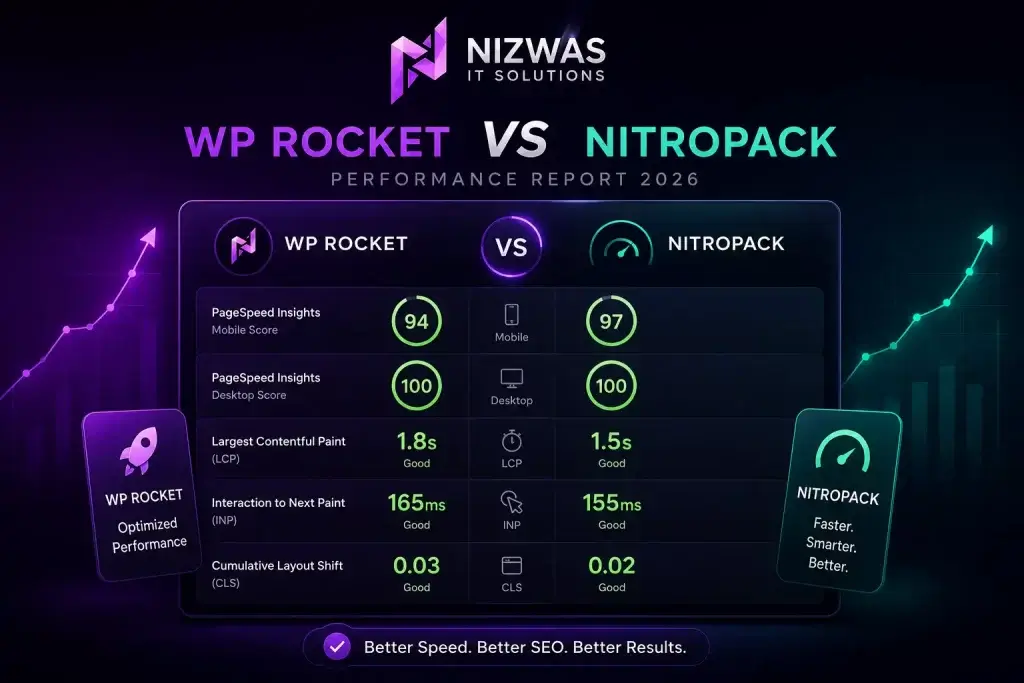
| Mobile Score | 94 |
| Desktop Score | 100 |
| LCP | 1.8 s |
| INP | 165 ms |
| CLS | 0.03 |
After NitroPack
| Metric | Result |
|---|---|
| Mobile Score | 97 |
| Desktop Score | 100 |
| LCP | 1.5 s |
| INP | 155 ms |
| CLS | 0.02 |
Performance Summary
NitroPack often achieves slightly higher PageSpeed Insights scores because of its integrated CDN and cloud-based optimization.
However, when WP Rocket is combined with:
- Cloudflare
- BunnyCDN
- Imagify
- High-quality hosting
the real-world performance difference is often minimal.
For many business websites, visitors are unlikely to notice a measurable difference in user experience.
SEO Impact
Website speed directly influences SEO through Core Web Vitals, crawl efficiency, and user engagement.
WP Rocket Helps Improve
- Largest Contentful Paint (LCP)
- Interaction to Next Paint (INP)
- Cumulative Layout Shift (CLS)
- Crawl efficiency
- Mobile performance
- User engagement
- Conversion rates
NitroPack Helps Improve
- Global page delivery
- Edge caching
- Image optimization
- Core Web Vitals
- Mobile experience
- Time to First Byte (TTFB)
- CDN performance
Both plugins can contribute to better search visibility when configured correctly and paired with strong technical SEO.
Pricing Comparison (2026)
Pricing is an important consideration, especially for agencies and businesses managing multiple websites.
| Feature | WP Rocket | NitroPack |
|---|---|---|
| Free Plan | ❌ | ✅ (Limited) |
| Annual License | ✅ | ✅ |
| One-Time Purchase | ❌ | ❌ |
| Built-in CDN | ❌ | ✅ |
| Image Optimization | Requires Imagify | Included |
| Database Optimization | Included | Not Included |
| Multiple Site Licenses | Yes | Yes |
Value Analysis
WP Rocket offers excellent value if you already use:
- Cloudflare
- BunnyCDN
- Imagify
- Premium hosting
NitroPack can reduce the need for separate optimization services, making it attractive for businesses that want an all-in-one platform.
Which Plugin Delivers Better Value?
Choose WP Rocket if you:
- Prefer full optimization control
- Already use Cloudflare or another CDN
- Manage multiple client websites
- Need built-in database optimization
- Want excellent WooCommerce compatibility
- Work as a developer or agency
Choose NitroPack if you:
- Want an all-in-one optimization platform
- Prefer automatic configuration
- Don’t want to manage multiple plugins
- Need a built-in CDN
- Have limited technical knowledge
- Want faster setup with minimal maintenance
Final Verdict, E-E-A-T, FAQs & SEO Schema
After comparing features, performance, pricing, WooCommerce compatibility, and real-world optimization results, it’s time to answer the most important question:
WP Rocket vs NitroPack: Which Wins in 2026?
The answer depends on your website, hosting environment, technical expertise, and long-term goals. Both plugins are among the best WordPress optimization solutions available, but they serve slightly different audiences.
Quick Decision Guide
| If You Want… | Choose |
|---|---|
| Complete control over optimization | ✅ WP Rocket |
| One-click automatic optimization | ✅ NitroPack |
| Built-in CDN | ✅ NitroPack |
| Database Optimization | ✅ WP Rocket |
| Better developer flexibility | ✅ WP Rocket |
| Beginner-friendly setup | ✅ NitroPack |
| Agency managing multiple client websites | ✅ WP Rocket |
| Enterprise WordPress websites | ✅ WP Rocket |
| Small Business Website | ✅ NitroPack |
| WooCommerce Store | ✅ WP Rocket |
| Elementor Website | ✅ Both |
| Core Web Vitals Optimization | ✅ Both |
| Better long-term value | ✅ WP Rocket |
WP Rocket Pros & Cons
Pros
✔ Extremely lightweight
✔ Beginner-friendly interface
✔ Excellent documentation
✔ Works with almost every hosting provider
✔ Outstanding WooCommerce compatibility
✔ Built-in database optimization
✔ Delay JavaScript Execution
✔ Remove Unused CSS
✔ Supports Cloudflare
✔ Excellent developer control
✔ Affordable yearly pricing
✔ Stable updates
Cons
- No built-in CDN
- Requires an additional image optimization plugin (such as Imagify) for advanced compression
- Manual configuration may be needed for complex websites
NitroPack Pros & Cons
Pros
✔ Built-in CDN
✔ Cloud optimization
✔ Automatic image optimization
✔ Automatic Critical CSS
✔ Excellent PageSpeed scores
✔ Beginner-friendly
✔ Very little configuration required
✔ Built-in compression
✔ Excellent global delivery
Cons
- Higher recurring cost
- Less control for developers
- Requires a NitroPack account
- Database optimization is not included
- Dependence on an external cloud platform
Which Plugin Is Best for Different Website Types?
Small Business Website
Winner: NitroPack
If you want fast results without technical configuration, NitroPack is an excellent choice for brochure websites and local business sites.
Corporate Website
Winner: WP Rocket
Corporate websites often have custom functionality and integrations. WP Rocket offers more control and flexibility for long-term maintenance.
WooCommerce Store
Winner: WP Rocket
WooCommerce stores require careful handling of dynamic pages such as carts, checkouts, and customer accounts. WP Rocket provides excellent compatibility and greater control, making it our preferred option for online stores.
Elementor Websites
Winner: Tie
Both plugins work exceptionally well with Elementor. Your hosting quality and overall website optimization strategy will have a greater impact than the choice of plugin alone.
High-Traffic News Website
Winner: NitroPack
The integrated global CDN and edge caching make NitroPack a strong choice for websites serving a worldwide audience with heavy traffic.
Digital Agencies
Winner: WP Rocket
For agencies managing multiple WordPress websites, WP Rocket provides greater flexibility, predictable licensing, and seamless integration into custom optimization workflows.
Our Experience at Nizwas IT Solutions (E-E-A-T)
At Nizwas IT Solutions, website performance optimization is a core part of our WordPress development process—not an afterthought.
Our team has optimized websites across a wide range of industries, including:
- Healthcare
- Real Estate
- Plumbing & Home Services
- eCommerce
- Hospitality
- Education
- Corporate Businesses
- Professional Services
- Startups
We regularly work with:
- WordPress
- WooCommerce
- Elementor
- Gutenberg
- Bricks Builder
- Custom Themes
- Cloudways
- Hostinger
- AWS
- Google Cloud
- Cloudflare
- LiteSpeed Servers
Rather than relying solely on PageSpeed Insights scores, we evaluate real-world performance by focusing on:
- Faster loading times
- Improved Core Web Vitals
- Better user experience
- Reduced bounce rates
- Higher conversion rates
- Search engine visibility
- Long-term website stability
In our experience, there is no universal “best” plugin. The right choice depends on your hosting environment, website architecture, traffic patterns, and business objectives.
For many client projects, we recommend WP Rocket because it offers excellent flexibility, long-term stability, and compatibility with modern WordPress ecosystems. However, for businesses seeking an all-in-one, hands-off optimization solution, NitroPack is also an excellent option.
This recommendation is based on practical implementation across client websites—not just feature lists or marketing claims.
Final Verdict
After extensive comparison, here’s our overall assessment.
| Category | Winner |
|---|---|
| Ease of Setup | NitroPack |
| User Interface | WP Rocket |
| Developer Control | WP Rocket |
| Database Optimization | WP Rocket |
| CDN | NitroPack |
| Image Optimization | NitroPack |
| WooCommerce | WP Rocket |
| Elementor | Tie |
| Core Web Vitals | Tie |
| Pricing & Value | WP Rocket |
| Flexibility | WP Rocket |
| Beginner Experience | NitroPack |
Overall Winner for 2026
🥇 WP Rocket
While NitroPack delivers impressive results with minimal setup, WP Rocket earns our top recommendation due to its flexibility, outstanding compatibility, developer-friendly features, and excellent long-term value. When combined with quality hosting, Cloudflare (or another CDN), and proper technical SEO, WP Rocket consistently delivers exceptional performance without locking you into a cloud optimization platform.
Need Help Optimizing Your WordPress Website?
A caching plugin alone won’t solve every performance issue. Slow hosting, oversized images, inefficient themes, unnecessary plugins, and poor server configuration can all impact your site’s speed.
At Nizwas IT Solutions, we provide comprehensive WordPress optimization services, including:
- WordPress Speed Optimization
- Core Web Vitals Improvements
- Technical SEO Audits
- WooCommerce Performance Optimization
- Database Cleanup
- Image Optimization
- Cloudflare Configuration
- CDN Integration
- Server Optimization
- Ongoing WordPress Maintenance
Whether your goal is a 90+ PageSpeed Insights score, better search rankings, or a faster shopping experience for your customers, our team can help.
Frequently Asked Questions (FAQs)
1. Is WP Rocket better than NitroPack in 2026?
WP Rocket is often the preferred choice for developers and agencies because it offers greater control, excellent WooCommerce compatibility, and strong long-term value. NitroPack is ideal for users who prefer automated optimization with minimal setup.
2. Does NitroPack include a CDN?
Yes. NitroPack includes a built-in global CDN, image optimization, and edge caching, eliminating the need for a separate CDN provider.
3. Can WP Rocket achieve 90+ PageSpeed scores?
Yes. When configured correctly and paired with quality hosting, optimized images, and a CDN, WP Rocket can consistently achieve PageSpeed Insights scores above 90 on both desktop and mobile.
4. Which plugin is better for WooCommerce?
WP Rocket is generally the better choice for WooCommerce because it provides more control over caching dynamic pages while maintaining excellent compatibility with online stores.
5. Is NitroPack suitable for beginners?
Absolutely. NitroPack is designed for users who want an all-in-one optimization solution without manually configuring caching, image optimization, or a CDN.
6. Does WP Rocket include image optimization?
WP Rocket includes lazy loading and image handling features, but advanced compression and WebP conversion typically require an additional image optimization plugin such as Imagify.
7. Will either plugin improve Google rankings?
Neither plugin directly improves rankings. However, both can enhance Core Web Vitals, page speed, and user experience, which are important factors that support better SEO performance.
8. Which plugin is more affordable?
WP Rocket generally offers better long-term value for agencies and businesses, especially if you already use services like Cloudflare or another CDN.
9. Can I use WP Rocket with Cloudflare?
Yes. WP Rocket integrates seamlessly with Cloudflare and supports additional CDN providers such as BunnyCDN, KeyCDN, and Amazon CloudFront.
10. Should I hire experts for WordPress speed optimization?
If your website has custom functionality, WooCommerce, Elementor, or complex integrations, working with experienced professionals can help you achieve better performance while avoiding compatibility issues.