Part 1 — Why Your WordPress Website Feels Slow in 2026
A slow WordPress website is rarely just a technical inconvenience. For a business owner, it can mean fewer enquiries, abandoned shopping carts, lower engagement, wasted advertising spend, and a frustrating experience for people who are trying to contact or buy from you.
The difficult part is that WordPress websites can become slow for very different reasons. One website may have oversized hero images. Another may be suffering from a poor hosting environment. A WooCommerce store may be slowed by database queries, third-party scripts, or poorly configured plugins. An Elementor website might have excessive DOM elements and JavaScript. Simply installing a caching plugin does not automatically fix any of these problems.
This matters even more in 2026 because websites are expected to perform well on mobile devices and across different network conditions. A customer searching for an emergency plumber in Texas, a healthcare clinic in Canada, a real estate agency in the UK, or an online store in Australia may be browsing on a mobile connection rather than a fast office network. A site that feels acceptable on your own computer can feel painfully slow to someone else.
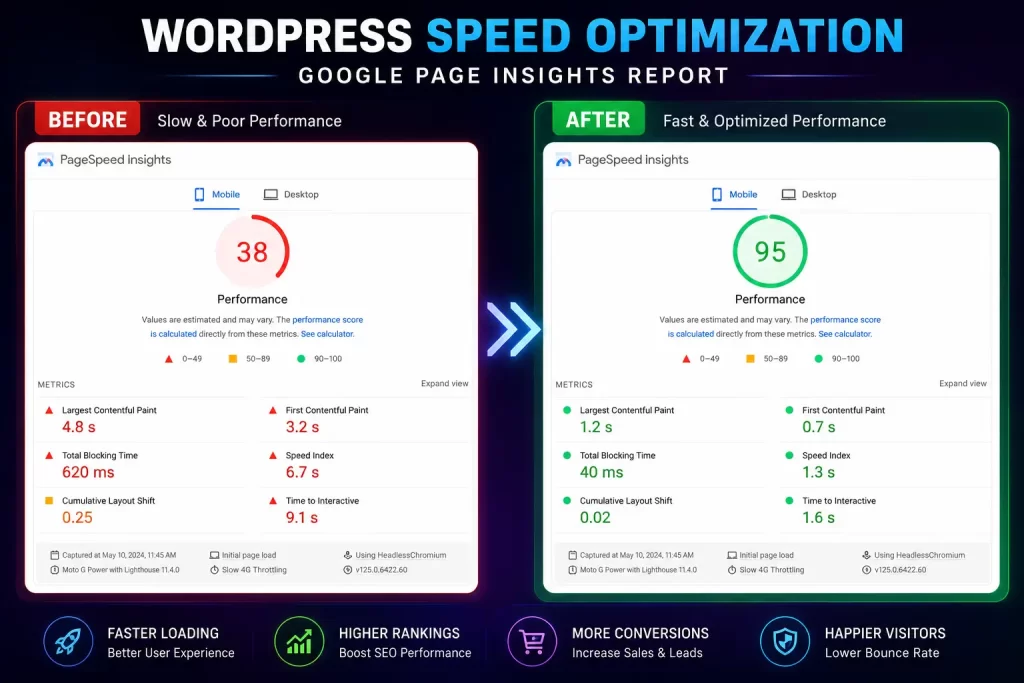
Google’s current performance framework also focuses on real user experience rather than a single “website speed” number. Core Web Vitals include Largest Contentful Paint (LCP), Interaction to Next Paint (INP), and Cumulative Layout Shift (CLS). Google recommends an LCP of 2.5 seconds or less at the 75th percentile for a good experience.
There is another important distinction: a website can have a PageSpeed score of 85 and still feel slow to visitors. Conversely, a site can score differently between lab testing and real users because the testing conditions, device, network, caching state, and geographic location vary. PageSpeed Insights combines Lighthouse lab analysis with real-world Chrome User Experience Report data when available.
From our hands-on WordPress audits, one of the most common patterns is not a single massive problem but several smaller problems stacked together: an oversized hero image, five unnecessary plugins, unoptimized fonts, third-party tracking scripts, weak caching, and a server that takes too long to respond.
The good news is that most of these issues are diagnosable.
In this guide, we will break down the 10 real causes of slow WordPress websites, explain how to identify each one, and show practical fixes you can apply without blindly installing another optimization plugin.
Part 2 — 10 Real Causes of a Slow WordPress Website
1. Cheap or Poorly Configured Hosting
Your WordPress site cannot be faster than the infrastructure serving it.
Low-cost shared hosting can become a bottleneck when multiple websites compete for CPU, RAM, disk I/O, PHP workers, or database resources. This becomes particularly noticeable during traffic spikes or when WordPress has to process dynamic requests.
A useful diagnostic clue is Time to First Byte (TTFB). If the server takes a long time before sending the initial HTML, optimizing images alone will not solve the underlying problem.
For a business website, look beyond the advertised storage space. Check PHP worker availability, server location, database performance, HTTP/2 or HTTP/3 support, object caching, CDN integration, and whether resources are isolated from other customers.
Fix: Move important business websites to properly configured managed or performance-focused hosting, enable server-side caching where appropriate, and choose infrastructure geographically sensible for your primary customers.
2. Oversized Images and Unoptimized Media
Images are often responsible for a surprisingly large percentage of a page’s transferred bytes.
A 4 MB hero image exported directly from Photoshop may look beautiful on a desktop monitor, but it is excessive for a mobile visitor. The same applies to service galleries, portfolio images, banners, product photos, and background videos.
Fix:
- Convert suitable images to WebP or AVIF.
- Resize images to the dimensions actually required.
- Compress before uploading.
- Use responsive image sizes.
- Lazy-load below-the-fold images.
- Avoid lazy-loading the primary LCP image.
- Serve images through an appropriate CDN when useful.
Do not simply compress everything as aggressively as possible. Quality matters, particularly for real estate, healthcare, hospitality, fashion, and eCommerce brands.
3. Too Many Plugins — or One Bad Plugin
The number of installed plugins is not automatically the problem. A well-developed plugin can be efficient, while a poorly coded plugin can create serious performance problems.
The bigger issue is unnecessary functionality.
For example, a site might have separate plugins for analytics, popups, social feeds, sliders, form enhancements, security, optimization, related posts, image optimization, and multiple marketing integrations. Some may load CSS and JavaScript globally even when their functionality is used on only one page.
Fix: Audit plugins based on what they load and what they actually do. Disable unused plugins, remove abandoned functionality, replace inefficient plugins where justified, and test performance after each significant change.
For difficult cases, staging environments and plugin-by-plugin testing are safer than randomly deactivating plugins on a live site.
4. Heavy Themes and Page Builders
Elementor and other visual builders can dramatically improve development speed, but an overly complicated page can generate excessive HTML, CSS, JavaScript, nested containers, animations, widgets, and third-party dependencies.
A homepage containing 30 sections does not necessarily need 30 different visual effects.
Fix: Reduce unnecessary sections and widgets, simplify nested layouts, remove unused animations, avoid loading assets site-wide when they are page-specific, and keep the design system consistent.
If a website has accumulated years of design changes, a targeted rebuild of the worst-performing templates can sometimes be more effective than endlessly tweaking optimization settings.
5. Render-Blocking CSS, JavaScript, and Fonts
The browser cannot immediately display everything it receives. It has to download, parse, and execute resources before certain content can be rendered.
Large CSS files, JavaScript bundles, external fonts, sliders, tracking systems, chat widgets, and marketing scripts can delay the visible page.
This is particularly relevant to LCP and INP. Too much JavaScript can also increase the amount of main-thread work required before the page becomes responsive.
Fix:
- Defer non-critical JavaScript.
- Remove unused CSS where practical.
- Minify CSS and JavaScript.
- Host fonts efficiently.
- Limit font families and weights.
- Load critical assets intelligently.
- Delay non-essential third-party scripts.
Do not blindly “delay all JavaScript.” Some scripts are essential for navigation, forms, checkout, or core functionality.
6. No Proper Page Caching
Without caching, WordPress may repeatedly execute PHP code and database queries for requests that could have been served much more quickly from a cached response.
A properly configured caching layer can reduce server processing and improve repeat visits.
Caching can exist at several levels: browser caching, page caching, object caching, server caching, and CDN caching.
Fix: Configure a suitable caching strategy using your hosting stack and plugins such as WP Rocket or equivalent tools. Avoid running several competing optimization systems that each attempt to rewrite, minify, cache, or defer the same resources.
7. Bloated WordPress Database
WordPress databases accumulate information over time: revisions, transients, expired options, spam comments, WooCommerce data, logs, abandoned sessions, and plugin-specific tables.
A large database is not automatically slow. The real problem is inefficient queries and autoloaded data that WordPress has to process on every request.
Fix: Review database health, remove unnecessary historical data carefully, clean expired transients, inspect oversized autoloaded options, and optimize problematic queries.
For WooCommerce websites, database cleanup should be handled carefully because order, customer, subscription, and product information can be business-critical.
8. Too Many Third-Party Scripts
Google Analytics, Meta Pixel, Google Ads conversion tracking, Hotjar, chat tools, review widgets, social feeds, appointment systems, maps, A/B testing platforms, and embedded videos can all add network requests and JavaScript execution.
One script may be harmless. Ten scripts can create a measurable delay.
Fix: Audit third-party requests in Chrome DevTools and PageSpeed Insights. Remove tools that no longer provide business value. Delay non-essential marketing scripts where technically and legally appropriate, and avoid loading a widget on every page when only the contact page needs it.
9. Poorly Optimized WooCommerce Functionality
WooCommerce websites are different from simple brochure sites because many pages and requests are dynamic.
Cart fragments, checkout functionality, product filters, search, inventory queries, related products, shipping calculations, payment gateways, and analytics can all introduce additional processing.
Fix: Cache only what is safe to cache, exclude cart and checkout pages from inappropriate caching, optimize product queries, review plugins that modify WooCommerce behavior, and use object caching where supported.
For larger stores, database indexing, hosting architecture, PHP workers, CDN configuration, and query profiling become increasingly important.
10. No Ongoing Performance Maintenance
A website that was fast when launched can become slow six months later.
New plugins are installed. Tracking scripts are added. Images become larger. WordPress and WooCommerce evolve. Marketing teams add popups and embeds. Developers modify templates. Hosting configurations change.
Performance is therefore not a one-time checkbox.
Fix: Establish a recurring performance process. Monitor Core Web Vitals, uptime, server response, page weight, important landing pages, conversion events, and major template changes.
The goal is not to chase a perfect laboratory score every week. The goal is to keep the website reliably fast for real customers.
Part 3 — How to Diagnose and Fix a Slow WordPress Website
The biggest performance mistake is changing five things at once.
If you install a new cache plugin, optimize 300 images, remove JavaScript, change the CDN, and upgrade hosting simultaneously, you may improve the website, but you will not know which change solved the problem.
A better approach is to diagnose first.
Step 1: Test the Important Pages
Do not test only the homepage.
For a service business, test:
- Homepage
- Main service page
- Location page
- Contact page
- Blog article
For WooCommerce:
- Homepage
- Category page
- Product page
- Cart
- Checkout
Test both mobile and desktop.
Use Google PageSpeed Insights, Lighthouse, Chrome DevTools, and Search Console’s Core Web Vitals report where data is available. PageSpeed Insights provides both simulated Lighthouse analysis and real-user information from CrUX when sufficient data exists.
Step 2: Identify Which Layer Is Slow
Think about performance as a chain:
DNS → connection → server → HTML → CSS/JS → images/fonts → browser rendering → interaction
If the server is slow, focus on hosting, PHP, database queries, caching, and backend processing.
If HTML arrives quickly but the main visual takes several seconds, investigate the LCP resource, render-blocking resources, fonts, CSS, and image delivery.
If the page visually loads but buttons and menus respond slowly, investigate JavaScript and INP.
This distinction prevents wasted effort.
Step 3: Check Core Web Vitals
The three current Core Web Vitals are:
| Metric | What it measures | Good target |
|---|---|---|
| LCP | Main content loading | ≤ 2.5s |
| INP | Interaction responsiveness | ≤ 200ms |
| CLS | Visual stability | ≤ 0.1 |
These should be treated as user-experience measurements rather than arbitrary speed scores. Google’s web.dev documentation recommends looking at real-user data and the underlying causes rather than optimizing a score in isolation.
Step 4: Optimize the Biggest Bottleneck First
Suppose your audit shows:
- TTFB: 1.8 seconds
- LCP: 4.5 seconds
- Hero image: 350 KB
- JavaScript: moderate
Compressing the hero image may help, but the server response is already consuming a large portion of your available time.
Conversely, if TTFB is healthy but the LCP image is discovered late because of CSS or JavaScript, upgrading hosting may produce very little improvement.
The optimization order should follow the evidence.
Step 5: Build a Performance Budget
Set practical limits for your website.
For example:
- Keep the primary page focused rather than excessively long.
- Avoid unnecessary third-party scripts.
- Compress large media before publishing.
- Limit font families and weights.
- Review plugin additions.
- Monitor Core Web Vitals.
- Test important landing pages after major changes.
Google’s web.dev guidance specifically recommends making the LCP resource discoverable and prioritizing critical resources rather than simply adding more preload directives. Too many preload hints can compete for bandwidth instead of helping.
Step 6: Re-Test Real Business Outcomes
Performance optimization should eventually connect back to business metrics.
Use GA4 to monitor events such as:
- Form submissions
- Phone clicks
- Quote requests
- Appointment bookings
- Add-to-cart events
- Checkout completion
- Purchases
A plumber’s website does not exist to achieve a green Lighthouse badge. It exists to generate calls and enquiries.
Likewise, an eCommerce website should care about product engagement and completed purchases, not just the homepage’s performance score.
This is why the strongest performance audits combine technical data with conversion data.
Part 4 — Common Mistakes and International Considerations
One of the most common mistakes is assuming that a higher PageSpeed score automatically means a better business website.
It does not.
PageSpeed Insights is an excellent diagnostic tool, but it is not a substitute for real-user monitoring, conversion data, server logs, or technical investigation. Google itself notes that lab and field measurements can differ because they represent different testing environments and datasets.
Another mistake is installing multiple optimization plugins. For example, combining several systems that all minify JavaScript, generate page cache, optimize CSS, lazy-load images, and modify CDN delivery can create conflicts rather than improvements.
A third mistake is deleting plugins without understanding dependencies. A plugin may appear unnecessary while another plugin or custom function relies on it. Always use staging and backups when making significant changes.
A fourth mistake is optimizing only the homepage. A real estate website may have slow property search pages. A healthcare site may have a heavy appointment page. A WooCommerce store may have a slow product filter. Those pages can matter more commercially than the homepage.
USA
For US businesses, local search often creates highly targeted landing pages such as “emergency plumber in Austin” or “family dentist in Chicago.” These pages need enough useful content for search intent without becoming overloaded with maps, review widgets, videos, tracking scripts, and duplicated page sections.
Google Business Profile, local structured data, GA4 conversion tracking, and call tracking should be considered alongside performance.
Canada
Canadian businesses may serve customers across large geographic areas, making mobile performance particularly important. A site targeting Toronto, Vancouver, Calgary, or smaller communities should be tested from different network conditions rather than assuming every visitor has high-speed connectivity.
For businesses collecting customer information, privacy and consent requirements should also be considered when deploying analytics and marketing scripts.
UK
UK businesses frequently compete in mature local search markets where service pages, location pages, reviews, and comparison content are common. Performance optimization should therefore focus on maintaining useful content while controlling the amount of JavaScript, imagery, and third-party functionality.
Cookie and privacy implementations can also add scripts, so consent tooling should be reviewed as part of the performance audit rather than treated as completely separate.
Australia
Australian businesses can serve customers across significant geographic distances. A website may be hosted in one region while customers access it from another. CDN strategy, server location, image delivery, and caching can therefore have a noticeable impact.
For trades such as electricians, builders, plumbers, and home services, mobile performance is especially relevant because prospective customers may be searching while away from a desktop computer.
UAE
Businesses targeting the UAE often use multilingual content, WhatsApp integrations, maps, lead forms, tracking systems, and visually rich designs. These features can be valuable commercially, but each additional integration should have a performance cost considered during development.
A premium website does not need to be a heavy website. Strong visual design and fast delivery can coexist when assets, fonts, scripts, caching, and responsive layouts are planned from the beginning.
Across all five markets, the principle is the same: optimize for the customer you actually serve, not an imaginary perfect PageSpeed score.
Part 5 — Conclusion: Make WordPress Fast by Finding the Real Bottleneck
When someone asks, “Why is my WordPress website so slow?”, there is rarely one universal answer.
The cause may be hosting, images, plugins, Elementor complexity, JavaScript, fonts, caching, database queries, WooCommerce functionality, third-party scripts, or simply the absence of ongoing maintenance.
The right solution starts with measurement.
Test the pages that matter. Compare mobile and desktop performance. Check TTFB and Core Web Vitals. Inspect the waterfall. Identify the largest bottleneck. Fix one layer at a time, then measure again.
Most importantly, connect performance work to business outcomes. A faster contact page should help users reach you. A faster service page should make it easier to request a quote. A faster product page should make browsing and purchasing easier.
Google’s guidance also makes an important distinction: strong page experience can contribute to search success, but relevance and helpful content still matter. Performance should support the overall website rather than replace good SEO, useful content, strong information architecture, or conversion-focused UX.
At Nizwas IT Solutions, we approach WordPress performance as a technical and business problem rather than simply trying to increase a Lighthouse number. Our broader website development and performance work covers WordPress development, performance optimization, SEO, tracking, and ongoing technical improvements.
If your WordPress website has become noticeably slower, a proper performance audit can help identify whether the real issue is your hosting, database, plugins, frontend assets, caching, or third-party integrations before you spend money on unnecessary changes.
The objective is simple: make the website faster for real users while keeping the functionality your business actually needs.
FAQ’s
1. Why is my WordPress website slow even with a caching plugin?
A caching plugin can reduce page-generation time, but it cannot automatically fix oversized images, slow hosting, excessive JavaScript, third-party scripts, database problems, or an inefficient theme. If the bottleneck is outside page caching, you need to identify and address that specific layer.
2. How can I make my WordPress website load faster on mobile?
Start by optimizing the mobile LCP element, usually a hero image or large text section, then reduce unnecessary JavaScript, compress images, optimize fonts, and configure effective caching. Test the actual mobile experience with PageSpeed Insights rather than relying only on desktop results.
3. Does Elementor make WordPress websites slow?
Elementor itself does not automatically make every website slow, but complex Elementor layouts can generate additional HTML, CSS, JavaScript, widgets, animations, and third-party assets. A well-structured Elementor website can perform well when unnecessary elements and assets are controlled.
4. How much does it cost to speed up a WordPress website?
The cost depends on the cause and complexity of the website. A simple site may only need image, caching, and asset optimization, while a WooCommerce store with hosting, database, plugin, and custom-code problems may require a deeper technical optimization project.
5. Why is my WordPress website slow in the USA but faster for me in India?
The difference can come from server location, CDN configuration, routing, caching, network conditions, and where your visitors are located. If your primary customers are in the USA, UK, Australia, Canada, or UAE, performance should be tested from relevant geographic regions instead of relying solely on a test performed near your own server.
6. Can a slow WordPress website hurt SEO?
A slow website can contribute to a poor user experience, and Core Web Vitals are among the page-experience signals Google considers. However, speed is not a substitute for relevance, helpful content, technical SEO, or search intent; improving performance should be part of a broader SEO strategy.